This repository was archived by the owner on Jul 23, 2026. It is now read-only.
Repository navigation
This repository was archived by the owner on Jul 23, 2026. It is now read-only.
Zen Hush — background-tab toast theme change mod #2118
Description

Name
Zen Hush
Description
Restyles the background-tab toast: opacity, blur, corner rounding, size, and fade speed.
Homepage
https://github.com/chakri192/zen-hush
Image
https://raw.githubusercontent.com/chakri192/zen-hush/master/mod/screenshot.png
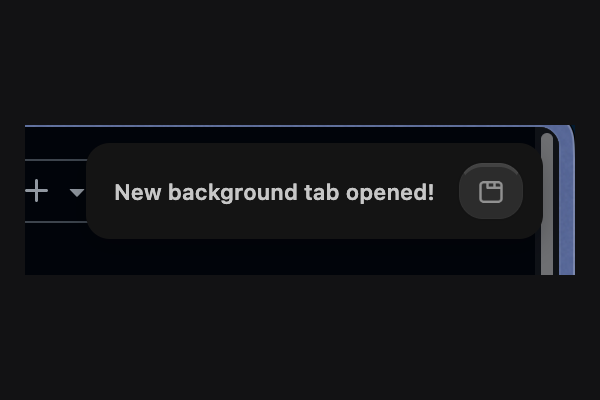
Type
- JSON Color Theme
Theme Styles
/* ==========================================================================
   Zen Hush — background-tab toast declutter mod
   Targets Zen Browser's `hbox.zen-toast` (the element behind
   `zen.view.compact.show-background-tab-toast`)
   ========================================================================== */

.zen-toast {
  display: var(--mod-zenhush-display, flex) !important;
  transition: opacity var(--mod-zenhush-fade_duration, 0.15s) ease !important;
  opacity: var(--mod-zenhush-opacity, 1) !important;
  background: var(--mod-zenhush-background_color, rgba(20, 20, 20, 1)) !important;
  backdrop-filter: blur(var(--mod-zenhush-blur, 0px)) !important;
  border-radius: var(--mod-zenhush-border_radius, 12px) !important;
  padding: var(--mod-zenhush-padding, 6px 10px) !important;
  max-width: var(--mod-zenhush-max_width, 260px) !important;
  box-shadow: var(--mod-zenhush-shadow, 0 4px 14px rgba(0, 0, 0, 0.25)) !important;
}

.zen-toast label {
  font-size: var(--mod-zenhush-font_size, 11px) !important;
  opacity: 0.9 !important;
}

.zen-toast:hover {
  opacity: 1 !important;
  background: var(--mod-zenhush-background_hover, rgba(20, 20, 20, 1)) !important;
}

.zen-toast #zen-open-background-tab-button {
  border-radius: var(--mod-zenhush-border_radius, 12px) !important;
}
Readme
# Zen Hush (mod)

Restyles Zen Browser's built-in background-tab toast — the small popup behind `zen.view.compact.show-background-tab-toast`. Every visual property is a dropdown in the Marketplace settings panel, no manual CSS editing.

## What it changes

- **Show toast at all** — on / fully off
- **Opacity** — 100 / 85 / 65 / 45%
- **Background** — dark glass, light glass, solid black, accent tint
- **Blur** — none, subtle, standard, heavy
- **Corner rounding** — square, soft, rounded, pill
- **Text size** — small, medium, large
- **Max width** — compact, standard, wide
- **Distance from screen edge** — tight, normal, loose
- **Fade speed** — instant, fast, slow

Ships with a solid, no-blur look by default — that read cleaner against a busy desktop than the glassy default it started with.

## Selector note

Targets `hbox.zen-toast` directly. This was confirmed by live-inspecting the toast in the Browser Toolbox — other public mods reference `#zen-toast-container` and `.description`, but this build's markup has no wrapper container and no `.description` class. Don't copy those selectors from elsewhere; they won't match.

## Install (local testing)

1. `about:config` → confirm `toolkit.legacyUserProfileCustomizations.stylesheets` is `true`.
2. Copy `chrome.css` into your Zen profile's `chrome/` folder (create it if missing — `about:support` → "Profile Folder" → Open Folder, then make a `chrome/` subdirectory).
3. Fully quit Zen (`Cmd+Q`) and reopen.

## Install (as a Marketplace mod)

This folder follows the submission layout: `chrome.css` + `preferences.json` + this README + a 600×400 screenshot. See the top-level `../README.md` for the full checklist.

## Scope and limits

This mod only controls the toast's *appearance*. It can't read the clock or know which site triggered a notification — that needs JavaScript, which Zen Mods don't run. Scheduled quiet hours and per-site muting live in the companion WebExtension at `../extension`.
Activity