
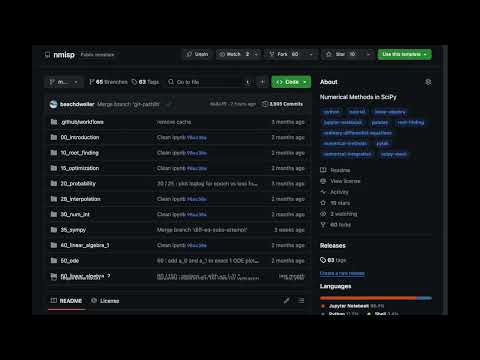
이 저장소는 다양한 수치 해법을 Python 언어와 그 확장 기능인 SciPy 를 이용하여 설명하고자 함.
This repository aims to describe various numerical methods in Python programming language and its extension SciPy.
flowchart TD
    A["00 Introduction<br>소개"]
    B["10 Root Finding<br>방정식의 근"]
    C["15 Optimization<br>최적화"]
    D["20 Probability & Statistics<br>확률과 통계"]
    E["28 Interpolation<br>보간법"]
    F["30 Numerical Integration<br>수치 적분"]
    G["35 SymPy<br>기호 연산"]
    H["40 Linear Algebra 1<br>선형대수 1"]
    I["50 ODE<br>상미분방정식"]
    J["60 Linear Algebra 2<br>선형대수 2"]

    A --> B
    A --> D
    A --> H
    B --> C
    B --> E
    E --> F
    F --> G
    F --> I
    H --> J
    H --> I
| 폴더 Folder |
주제 Topic |
주요 내용 Key Contents |
|---|---|---|
00_introduction |
소개 Introduction |
부동소수점, 파이썬 복습 Floating point, Python review |
10_root_finding |
방정식의 근 Root Finding |
순차, 이분법, 뉴턴-랩슨 Sequential, Bisection, Newton-Raphson |
15_optimization |
최적화 Optimization |
커브피팅, 분류, 선형계획 Curve fitting, Classification, LP |
20_probability |
확률 통계 Probability |
확률변수, 회귀, 판다스 Random variables, Regression, Pandas |
28_interpolation |
보간법 Interpolation |
보간법 Interpolation |
30_num_int |
수치 적분 Numerical Integration |
직사각형, 사다리꼴, 심프슨, 수렴 차수 Rectangle, Trapezoid, Simpson, Convergence order |
35_sympy |
기호 연산 SymPy |
기호 연산, 보 반력 Symbolic math, Beam reaction |
40_linear_algebra_1 |
선형대수 1 Linear Algebra 1 |
벡터, 내적, 외적, 행렬 Vectors, Dot/Cross product, Matrix |
50_ode |
상미분방정식 ODE |
오일러, 훈, 룽게-쿠타 Euler, Heun, Runge-Kutta |
60_linear_algebra_2 |
선형대수 2 Linear Algebra 2 |
연립방정식, 고유값, 가우스 소거 Systems of equations, Eigenvalues, Gauss elimination |
Google Colab 에서 실행하기
Running on Google Colab
- 이 저장소의
ipynb파일을 엶
Open anipynbfile of this repository 클릭
Click on런타임아래모두 실행시도
TryRun allunderRuntime

- 저장소의 분기 사본을 만듦
Fork the repository - 분기된 저장소에서
ipynb파일을 엶
Open theipynbfile from the forked repository
Click on- 파일을 수정
Make changes 파일메뉴 아래Github 에 사본 저장
ChooseSave a copy in GitHubunderFilemenu
git clone https://github.com/kangwonlee/nmisp
cd nmisp
conda env create -n nmisp -f ./tests/environment.2023.09.yml
conda activate nmisp
jupyter notebookconda activate nmisp
pytest -n auto tests/
- This software was initially supported by the Korea Ministry of Land, Infrastructure, and Transportation. It was also supported by the Korean Agency for Infrastructure Technology Advancement. (18TLRP-B117133-03)
이 소프트웨어는 대한민국 국토교통부 건설교통과학기술진흥원 교통물류연구사업의 지원을 받아 시작되었음. (18TLRP-B117133-03) - Also, this software got help from generative artificial intelligence : Google Gemini Advance and Anthropic Claude Opus 4.6 in improving the text and source code quality.
또한, 이 소프트웨어는 문장과 코드 품질 향상을 위해 생성형 인공지능 구글 제미니 어드밴스와 앤스로픽 클로드 오퍼스 4.6의 도움을 받았음.