rt_ui is a C++ library which can be used to render dynamic layouts.
The idea is to have a pure C++ UI layouting and rendering system which can either use a pure software render-target or specialized render-targets, e.g. using OpenGL. The heart of the library is the abstract Component class. A component must implement 3 methods:
Size get_requested_size(const Size& provided_size) noexcept = 0;
void layout(const Rect& provided_rect) noexcept = 0;
void render(RenderTarget& render_target) noexcept = 0;
The get_requested_size method is used by a parent component to know how much space a child component wants to occupy. This method is needed during layouting to reserve some rectangles on the screen with specific size on the render-target. The layout method arranges the components and the render method finally renders the component. It's some kind of recursive handshaking process between parent and child components. The parant must not provide the requested size, it can be smaller than requested, e.g. for Flex layouts or simply when there is not enough space.
The library can be easily extended with new components by implementing at minimum this 3 methods.
The software render-target will have full test-coverage in the future. This tests can be used to validate new render-targets. Also, the UI logic will be tested in the future by using the software render-target. Ideally, the software render-target will produce the same results on every machine and have no floating point errors or similar. This way the components can be tested easily, and also complete interface setups can be tested by simply comparing the contents of render-targets. One render-target loaded from disk which contains the expected result and a render-target which will be populated by the UI.
Similar to Flutter, the UI can be constructed easily directly in the code. The code will look very similar to XML described interfaces, but we do not need a parser and it's very dynamic because we have full control of the UI from the code.
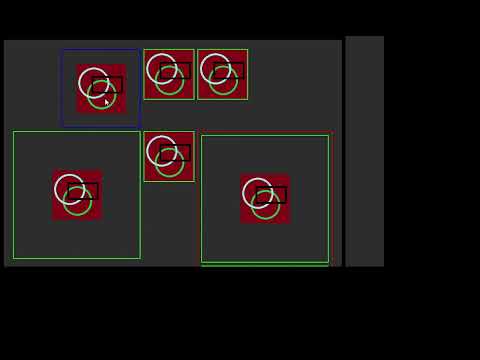
auto* grid = new Grid;
	grid->push_row({
		new HAlignR(
			new Box(BoxDesc().padding(4).border_thickness(2).border_color(Color(0, 255, 0, 255)),
				new HitImage("C:/data/test.png")
			)
		),
		new Box(BoxDesc().padding(4).border_thickness(2).border_color(Color(0, 255, 0, 255)),
			new HitImage("C:/data/test.png")
		),
		new Box(BoxDesc().padding(4).border_thickness(2).border_color(Color(0, 255, 0, 255)),
			new HitImage("C:/data/test.png")
		)
	});
	grid->push_row({
		new Box(BoxDesc().padding(4).border_thickness(2).border_color(Color(0, 255, 0, 255)),
			new HitImage("C:/data/test.png")
		),
		new Box(BoxDesc().padding(4).border_thickness(2).border_color(Color(0, 255, 0, 255)),
			new HitImage("C:/data/test.png")
		),
		new Box(BoxDesc().padding(4).border_thickness(2).border_color(Color(255, 0, 0, 255)).margin(4),
			new VStack({
				new Box(BoxDesc().padding(4).border_thickness(2).border_color(Color(0, 255, 0, 255)),
					new HitImage("C:/data/test.png")
				),
				new Box(BoxDesc().padding(4).border_thickness(2).border_color(Color(0, 255, 0, 255)),
					new HitImage("C:/data/test.png")
				)
			})
		)
	});

	Body body(rt_size,
		new Box(BoxDesc().border_thickness(10).margin(20),
			grid
		)
	);