Man with the Golden Build
A decompilation and native source port of a 1997 Nintendo 64 first-person shooter, reimplemented in portable C so it can be studied, preserved, and run natively on modern machines.
-blue.svg)


Important
This project ships no game. It contains decompiled code and an original port layer — no ROM and no copyrighted assets (graphics, audio, models, fonts, level data). To run the port you must supply your own legally-dumped copy of the game. Please read DISCLAIMER.md.
| Runway | Cradle |
|---|---|
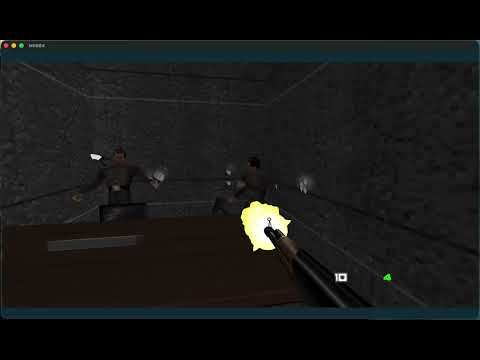 |
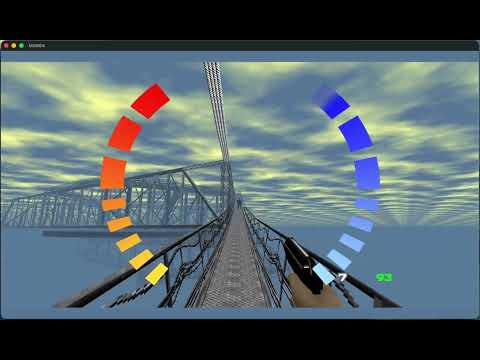 |
| Watch on YouTube | Watch on YouTube |
Bring your own ROM. Downloads contain no game data — you supply your own legally-dumped GoldenEye 007 ROM at runtime (see DISCLAIMER.md).
MGB64 ships as a real app: a Dear ImGui launcher rendered in-process — insert a ROM, configure everything, jump to any level, and play, with an in-game overlay (F1) for live settings. One portable codebase builds it on all three desktop platforms.
| Platform | Download | Notes |
|---|---|---|
| macOS 13+ (Apple Silicon) | MGB64.app — latest release | .app in a .zip. Unsigned, so on first launch right-click → Open to pass Gatekeeper. Intel Macs: build from source (Homebrew SDL2 is single-arch, so no universal prebuilt yet). |
| Windows 10/11 (x64) | Portable .zip — latest release |
Unzip and run ge007.exe (bundles SDL2.dll). Or build from source (MSYS2/MinGW, a few minutes). |
| Linux (x86‑64, glibc 2.35+) | AppImage — latest release | chmod +x and run (bundles SDL2/GL); a .tar.gz is also attached. Or build from source (SDL2 + GL + D‑Bus dev packages). |
Platform status. macOS is built and tested by the maintainers. Windows and Linux use the same portable codebase and are wired into the build and release pipeline (
.github/workflows/release.yml); their prebuilt binaries are attached to tagged releases (starting with v0.3.1) but are not yet maintainer‑tested. Please report platform issues via the app's Diagnostics → Export Diagnostics button or the bug report template.
How it all works and how each platform is built: docs/APP_ARCHITECTURE.md.
MGB64 combines the decompiled game code with a native PC/macOS port. It builds on the same N64 decompilation ecosystem as Super Mario 64 and Ocarina of Time decompilations and the Perfect Dark port:
- A decompilation — the original N64 game's logic, rewritten as readable, buildable C and MIPS assembly. The native port is the supported build today; byte-identical N64 ROM rebuilding is still in progress.
- A native port — a platform layer (
src/platform/) that runs the same game code on PC/macOS: it loads your ROM at runtime, translates the N64 display lists to a modern GPU, and provides audio, input, and file I/O. No copyrighted data is compiled into the binary ("bring your own ROM").
Experimental. This is a research/preservation project, not a polished consumer release, and it is not a 1:1 replacement for original hardware.
- ✅ The decompilation covers the bulk of the game's systems (rendering, AI, combat, level logic, menus, audio).
- ✅ The native port builds and runs from a clean checkout + your own ROM
(
cmake -B build && cmake --build build), with native rendering, audio, and keyboard/mouse + gamepad input. - ✅ Asset-free: no ROM media is compiled into the binary — textures, audio, animation, fonts, and logos are read from your ROM at runtime.
- ✅ Opt-in visual remaster: a one-flag
--remastermode layers modern post-processing (ambient occlusion, bloom, filmic tonemap, colour grade, FXAA, supersampling) and optional user-built HD texture packs on a native Metal backend, while--faithfulpreserves the byte-faithful 1997 look. See docs/VISUAL_MODES.md. ⚠️ Platform support: developed and tested on macOS (Apple Silicon) only. Windows and Linux have CMake/build-system support and are intended targets, but they have not been tested by the maintainers yet — expect build or runtime issues, and please report them (see docs/BUILDING.md for the platform validation report template).- 🚧 Rebuilding the original N64 ROM (byte-matching), SDK provenance cleanup, and renderer/audio parity are the main open areas. See ROADMAP.md for the precise state and good first issues.
⚠️ The tree still contains inventoried N64 SDK/libultra compatibility material that is not MIT-licensed first-party code. See THIRD_PARTY.md before describing or redistributing the project.
There are known graphical and gameplay issues and occasional instability. Bug reports and PRs are very welcome.
Beyond the CLI, MGB64 builds an in-process app (default -DMGB64_APP=ON):
a Dear ImGui launcher rendered in the same window as the game — no separate
process, one portable codebase for macOS/Windows/Linux. It provides a native
"insert ROM" picker with validation, an auto-generated settings panel (every
engine config key), quick launch-to-level / multiplayer, and an in-game overlay
(F1) with live settings. Automation/diagnostic invocations bypass the launcher
and run the unchanged engine path, so the validation harness is unaffected.
- Run the launcher:
./build/ge007(no arguments). - macOS bundle:
./macos/Scripts/build_gl_app.sh→build-macos-app/MGB64.app. - Architecture + per-OS build/seams: docs/APP_ARCHITECTURE.md.
macOS is validated; Windows/Linux use only portable seams and are wired in the build. A prebuilt "Download" section (rolling latest + tagged releases) is planned.
Warning
This port has only been built and tested on macOS (Apple Silicon) so far. The Linux and Windows (MSYS2/MinGW64) paths below are provided in good faith but are not yet verified by the maintainers. If they fail for you, please open a platform validation report issue.
Full instructions — toolchain, dependencies, native-port setup, and the matching-target asset-extraction path — are in docs/BUILDING.md. In brief:
- Install the build dependencies for your platform (see the build doc).
- Build the native port with CMake; the public checkout compiles without ROM media or extracted assets.
- Run the port with a ROM you legally own using
--rom /path/to/rom.z64, or place it at the repository root for auto-detection. - Matching-target contributors can use the asset-extraction and Makefile path described in the build docs.
# Native port (PC/macOS):
cmake -B build -DCMAKE_BUILD_TYPE=Release
cmake --build build -jYou must already own and supply the ROM — the port reads it at runtime; no game data is bundled. The default command boots normally into the game frontend:
./build/ge007 --rom "/path/to/baserom.u.z64"Common startup examples:
# Boot normally with an explicit ROM path:
./build/ge007 --rom "/path/to/baserom.u.z64"

# Direct-boot a solo stage by name:
./build/ge007 --rom "/path/to/baserom.u.z64" --level dam

# Direct-boot mission 2 on Secret Agent:
./build/ge007 --rom "/path/to/baserom.u.z64" --mission 2 --difficulty secret

# Direct-boot by raw internal LEVELID, useful for validation:
./build/ge007 --rom "/path/to/baserom.u.z64" --level 33

# Keep saves/config in a dedicated directory:
./build/ge007 --rom "/path/to/baserom.u.z64" --savedir "$HOME/.mgb64"
If you don't pass --rom, the port auto-detects a compatible ROM in the working
directory and common locations (~/Downloads, ~/Documents, ~/Desktop, ~)
by size, N64 header, and internal cartridge name.
The port renders a faithful original look and an opt-in remaster, each a
single flag. Note the default boot (no flag) already enables the cinematic post-FX
and 2× supersampling — so pass --faithful for the byte-faithful 1997 look.
| Mode | Command | What you get |
|---|---|---|
| Faithful | ./build/ge007 --faithful --level dam |
Byte-faithful 1997 original — post-FX off, native resolution, stock textures, classic FOV/crosshair/aim. |
| Faithful HD | ./build/ge007 --faithful-hd --level dam |
The faithful look at 2× supersampling and HD-pack-ready — set Video.TexturePack for HD textures. |
| Default | ./build/ge007 --level dam |
Cinematic post-FX (colour grade, tonemap, bloom, FXAA, sharpen, vignette, dither) + 2× SSAA; ambient occlusion off. |
| Remaster | ./build/ge007 --remaster --level dam |
The full remaster: adds screen-space ambient occlusion on top of the default look (uses the native Metal backend on macOS). |
The three preset flags are transient and mutually exclusive — none writes
ge007.ini. Every individual effect is also a Video.*/Input.* setting (with a
GE007_* env-var alias) you can toggle via --config-override; run
./build/ge007 --list-settings for the full list. HD texture packs are built from
your own ROM dump with tools/texpack and are never distributed. Full details:
docs/VISUAL_MODES.md.
Useful runtime options:
| Option | Purpose |
|---|---|
--rom PATH |
Load the ROM from PATH. A positional ROM path also works. |
--level NAME |
Direct-boot a supported solo stage by slug, for example dam, facility, runway, surface1, bunker1, or egypt. |
--level N |
Direct-boot a raw internal LEVELID. Example: 33 is Dam. These numbers are not mission-order numbers. |
--mission N |
Direct-boot solo mission order 1 through 20. Use this when you mean "mission 2", "mission 3", etc. |
--difficulty VALUE |
Select the direct-boot difficulty. Values: agent, secret, 00, 007, or numeric 0 through 3. Defaults to Agent. |
--savedir PATH |
Store ge007.ini and save data in PATH. Without this, the port uses the current directory when writable, then falls back to a per-user directory. |
--list-settings |
Print registered persistent settings and exit. Does not require a ROM. |
--dump-config |
Print the current config view after loading ge007.ini and exit. Does not require a ROM. |
--config-override KEY=VALUE |
Override a persistent setting for this run without saving it. Repeatable. |
--faithful |
Boot the pixel-/feel-faithful original (post-FX off, native res, stock textures, classic FOV, no modern crosshair/hitmarkers/minimap, vanilla pad aim) for this run only. Transient — does not modify ge007.ini. Explicit --config-override still wins. See docs/VISUAL_MODES.md. |
--faithful-hd |
Like --faithful but at 2× supersampling and HD-pack-ready (set Video.TexturePack). Transient; mutually exclusive with --faithful/--remaster. |
--remaster |
Boot the full opt-in remaster in one switch: ambient occlusion, bloom, filmic tonemap, colour grade, FXAA, sharpen, vignette, dither, 2× SSAA (native Metal backend on macOS). Transient; mutually exclusive with --faithful/--faithful-hd. See docs/VISUAL_MODES.md. |
--config-set KEY=VALUE |
Set a persistent config value, save ge007.ini, and exit. Repeatable. Does not require a ROM. |
--reset-config |
Reset registered persistent settings to defaults, save ge007.ini, and exit. Does not require a ROM. |
--no-input-grab |
Do not capture the mouse. Useful while testing windowed startup. |
--background |
Run without grabbing input and with background-friendly settings. Useful for smoke tests. |
If you pass no direct-boot option, the game starts normally. --level accepts
stage slugs or raw internal LEVELID values; --mission accepts campaign order.
For example, use --mission 2 or --level facility for mission 2, not
--level 2. See docs/BUILDING.md for more platform
setup detail.
| Action | Keyboard & mouse | Gamepad |
|---|---|---|
| Move | W A S D |
Left stick |
| Look | Mouse | Right stick |
| Fire | Left click | RT |
| Aim (hold) | Right click | LT |
| Cycle weapon | Mouse wheel | Y (next) / Back (prev) |
| Reload | R |
— |
| Interact | F |
— |
| Crouch (toggle) | C / LCtrl |
L3 |
| Lean L/R (in aim mode) | Q / E |
— |
| Watch menu | Tab |
— |
| Pause | Esc |
— |
| Mute audio | M |
— |
| Show controls | H |
— |
Mouse sensitivity, window size, display mode, and VSync are configurable in
ge007.ini. By default the port writes config/save data in the current
directory when it is writable; use --savedir PATH to keep a separate profile.
The display mode key is Video.WindowMode with windowed, borderless, or
exclusive; for example: --config-set Video.WindowMode=borderless. VSync is
Video.VSync with off, on, or adaptive; frame pacing is Video.FrameCap
with 30, 60, or display. Output gamma is Video.Gamma, where 1.0 leaves
colors unchanged.
Video.RenderScale adjusts the internal scene framebuffer from 1.0 to 4.0
for supersampling. Video.MSAA accepts 0, 2, 4, or 8 samples for scene
anti-aliasing.
Video.HiDPI controls Retina/high-DPI drawable rendering. It defaults to 0
for steadier performance on large windows; set it to 1 for opt-in native
display-pixel rendering.
Video.FovY controls the normal gameplay vertical field of view from 45 to
105 degrees (default 50 for a modern widescreen feel; --faithful restores
the classic 60); scoped weapons and watch animations still use their own zoom
values.
Video.RetroFilter is auto, off, or on for the VI-style soft output
filter. Video.Display selects the zero-based SDL display index and falls back
to display 0 if the saved index is unavailable. Video.WindowX and
Video.WindowY are relative to that display, with -1 meaning centered.
Run ge007 --list-displays to print detected SDL displays and fullscreen modes.
For Video.WindowMode=exclusive, set Video.FullscreenWidth,
Video.FullscreenHeight, and optionally Video.FullscreenRefresh; leave them
at 0 to use SDL's default display mode.
Pressing H also prints the full control list to the console.
This is an experimental, work-in-progress port — not a 1:1 replacement for original hardware. It runs the game's decompiled code natively; it is not an emulator and is not cycle-exact. Rendering and audio use some documented compatibility approximations, and a few areas are still converging toward exact N64 behavior. PORT.md has the full, honest breakdown: what is and isn't faithful, the known divergences, and the validation coverage. Please read it before filing parity bugs.
| Path | Contents |
|---|---|
src/game/ |
Decompiled game code |
src/platform/ |
Native port layer (SDL2 windowing, OpenGL + opt-in Metal backends, audio, input, config, ROM I/O) + the app↔engine seams (host_window, app_overlay_hooks, config_schema, input_bindings) |
src/app/ |
The in-process app shell (C++17 + Dear ImGui): launcher, panels (ROM / Settings / Launch / Controls / Modes / Diagnostics), in-game overlay, and diagnostics. Compiled into ge007 as the mgb64_app static library. See docs/APP_ARCHITECTURE.md. |
src/libultra/ |
N64 SDK compatibility material (see THIRD_PARTY.md) |
lib/ |
Vendored third-party libs: glad, stb, imgui, nfd, fonts (all listed in THIRD_PARTY.md) |
include/ |
Shared headers |
assets/ |
Asset build glue only (extraction config, linker scripts, .incbin wrappers). Extracted ROM data lands here at build time and is git-ignored. |
tools/ |
Build/extraction tooling (extractor, texture conversion, checksum, asm-processor, …) |
scripts/ |
Extraction, build, and release/launch helper scripts |
macos/ |
macOS packaging: the portable-app bundler (build_gl_app.sh → MGB64.app), the optional legacy Swift app shell, and signing/notarization scripts — see macos/README.md |
ld/, *.ld |
Linker scripts |
docs/ |
Build, status, architecture, and design documentation |
Contributions are welcome — see CONTRIBUTING.md for the workflow, coding style, and the one rule that matters most: never commit ROMs or any ROM-derived assets. Project conduct is covered in CODE_OF_CONDUCT.md, and vulnerability / repository hygiene reports are covered in SECURITY.md.
Maintainers should enable the tracked safety hooks once per checkout:
scripts/install_git_hooks.shThe hooks run the ROM/data contamination guard before commits and pushes.
This project builds directly on the n64decomp/007 decompilation, which we started from and continue to work off of. Our thanks to its authors and contributors for the foundational reverse-engineering effort that this port extends.
It also stands on the shoulders of the wider N64 decompilation community. Thanks
to the SM64, Ocarina of Time, and Perfect Dark decomp/port projects for the
tooling, conventions, and trail-blazing that make work like this possible, and
to the authors of asm-processor and the other bundled
or locally referenced tools.
First-party code in this repository (the port layer, build system, tooling, and documentation) is released under the MIT License. The MIT license does not grant any rights in the original game. See NOTICE.md for the short license/provenance summary.
The decompiled game code is a transformative work provided for research, preservation, and educational purposes. No copyrighted ROM or assets are distributed. All trademarks are the property of their respective owners, and this project is not affiliated with or endorsed by any rights holder. Please read DISCLAIMER.md in full before using this project.
Third-party components (including N64 SDK compatibility headers/source, bundled tools/libraries, and local-only matching-target tool placeholders) and their provenance are inventoried in THIRD_PARTY.md.
Maintainer release hygiene checks are documented in docs/RELEASE_CHECKLIST.md.