
Generate synthetic computer vision datasets. Fuse compatible image augmentations. Build and test your training pipeline with reproducible data.




vision-synth is a Python package for synthetic dataset generation and PyTorch image augmentation. Generate labelled shapes in COCO or YOLO format for object detection, instance segmentation, oriented bounding boxes, and keypoint / pose estimation. Use fixed seeds and configurable scenes to prototype models, check convergence, and test increasing difficulty.
The distribution ships two independent top-level packages. synth_datasets generates data and is torch-free. fused_transforms fuses compatible augmentations on torch tensors. Neither imports the other, so you can install and use either half alone.
| I need to… | Start here |
|---|---|
| Generate a synthetic computer vision dataset | Install and generate |
| Choose detection, segmentation, OBB, or pose labels | Task recipes |
| Check model convergence or scale difficulty | Prototyping guide |
| Stream samples into a PyTorch DataLoader | In-memory generation |
| Fuse an existing augmentation pipeline | Augmentation quickstart |
| Augment generated samples | Generate and augment |
Important
This package is Beta. The augmentation engine is not a general drop-in replacement for native Compose containers: it does not guarantee native pixels, input types, target processors, random streams, hooks, or universal speedups.
pip install vision-synthThe base package requires Python 3.10+ and needs no PyTorch install: it is enough for synthetic dataset generation (import synth_datasets), which is entirely torch-free. The image-augmentation engine needs the torch extra:
pip install "vision-synth[torch]"Install optional adapter ecosystems only when needed — each already pulls in torch:
pip install "vision-synth[kornia]"
pip install "vision-synth[torchvision]"
pip install "vision-synth[albumentations]"
pip install "vision-synth[all]"
For the vision-synth generate command line, add the cli extra: pip install "vision-synth[cli]".
Dataset generation lives in the standalone synth_datasets package (import synth_datasets), which never imports torch and needs no extra. There is no alias for it on the augmentation package; synth_datasets is the only import path.
Generate labelled synthetic data for computer vision prototyping, model convergence checks, and controlled difficulty experiments. Draw from four vocabularies — geometric primitives, animal silhouettes, symbols, and letters — and export COCO or YOLO for detection, segmentation, oriented bounding box (OBB), or keypoints. Your application supplies the model and training loop.
import tempfile

from synth_datasets import generate_dataset

with tempfile.TemporaryDirectory() as out_dir:
    # COCO detection, 70/20/10 split, reproducible (pass a real path to keep it)
    counts = generate_dataset(
        out_dir,
        num_images=100,
        fmt="coco",
        task="detection",
        seed=0,
    )

print(counts)
Per-split image counts for the synthetic COCO dataset
{'train': 70, 'val': 20, 'test': 10}
Swap fmt="yolo", task="obb", or class_mode="color" for other layouts, tasks, and class schemes. rectangle plus random per-shape rotation give oriented boxes real orientation. Feed samples from SyntheticGenerator.generate(n, seed=...) or a DataLoader via SyntheticIterableDataset without a disk round-trip. Direct generation and YOLO export keep sample storage bounded; COCO export retains per-split annotation metadata, and DataLoader batching/prefetching adds memory. See output and streaming contracts.
| Capability | What is implemented |
|---|---|
| Annotation tasks | Detection, instance segmentation, oriented bounding boxes, and keypoints / pose. |
| Output formats | COCO per-split _annotations.coco.json, or YOLO normalized text labels plus data.yaml. |
| Shape vocabularies | Geometric primitives, traced animal silhouettes, symbols, and stroke letters, each a registered family. |
| Class schemes | class_mode="shape", "color", or "shape_color"; COCO categories are 1-based on disk and YOLO classes 0-based. |
| Keypoint schemas | Per-family landmark tables with COCO visibility flags, for animals, symbols, and letters. Geometric primitives have no pose schema. |
| Backgrounds | Flat, gradient, Gaussian or impulse noise, value-noise texture, or crops of your own pictures. |
| Baked degradations | Gaussian blur and noise, JPEG, contrast, color cast, vignette, and quantization, applied once into the exported pixels. |
| Unlabelled clutter | distractors behind and occluders over the labelled objects; boxes and polygons keep full-object geometry. |
| Splits | Train/validation/test via split ratios, defaulting to 70/20/10. |
| Reproducibility | A fixed seed plus configuration reproduces generation in one environment. Background, clutter, and degradation knobs draw from side streams, so placement is stable. |
| Streaming | SyntheticGenerator.generate(n, seed=...) yields samples; SyntheticIterableDataset feeds a PyTorch DataLoader (needs the torch extra). |
| Command line | vision-synth generate ./ds 1000 --fmt yolo --task obb --shapes duck,camel (needs the cli extra). |
| Extension | register_writer adds an output format; subclass Background or Degradation for new canvases and effects. A new shape family is added in the package source (see the customization guide). |
| Dependencies | Direct generation uses Pillow and NumPy only — no torch, no source images, no optional augmentation backend. |
How hard the samples are to read is a set of ordinary config fields: background picks the canvas, degrade bakes camera effects into the pixels, and distractors/occluders add unlabelled shapes under and over the labelled ones. There is no difficulty= argument and no curriculum scheduler.
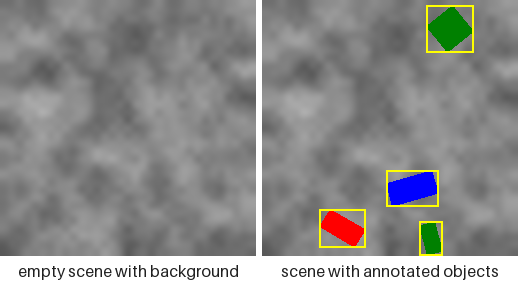
Above is one such knob, TextureBackground(): the canvas it paints, and the same canvas carrying its objects and their exported boxes. The docs picture every mode this way. Each knob draws from a side stream of its own rather than from the placement stream, so at a fixed seed switching one on cannot move an object — the shapes land in the same three places on every canvas.
Start with the prototyping and convergence guide: check a loader on a small export, overfit fixed easy samples, then evaluate held-out data while increasing scene difficulty. Passing a synthetic check does not establish accuracy on real images. See also the synthetic datasets docs, the difficulty bands, the dataset generation API, and examples/generate_synthetic_dataset.py.
For augmentation, the tensor-first engine recognizes supported Kornia, TorchVision, and Albumentations transforms—or builds a pipeline directly from numeric ranges—then composes compatible transform matrices before pixels are sampled.

Animated WebP renders on GitHub and in any browser; macOS Preview and Finder Quick Look show only the first frame.
You keep the readable pipeline: rotate, scale, shear, translate, flip. The engine finds compatible runs and can replace several geometric warps with one.
Warning
Use auxiliary targets only with explicitly supported spatial transforms. With data_keys present, an unknown or unclassified spatial passthrough is rejected before any segment executes, so the image and targets cannot silently diverge. Image-only calls may still run such a transform as a native passthrough; inspect every Unknown ... SPATIAL_KERNEL barrier warning before relying on it.
A conventional chain may interpolate the same pixels after every geometric operation:
Native composite — each transform is its own warp (3 warps):
flowchart LR
  IN["Input<br/>image + annotations"]
  subgraph W1["Warp 1"]
    A1[Rotate]
  end
  subgraph W2["Warp 2"]
    A2[Translate]
  end
  subgraph W3["Warp 3"]
    A3[HFlip]
  end
  OUT["Output<br/>image + annotations"]
  IN --> W1 --> W2 --> W3 --> OUT
  classDef warp fill:#f7d0f7,stroke:#ff00ff,color:#000;
  classDef input fill:#ffff00,stroke:#cccc00,color:#000;
  class A1,A2,A3 warp;
  class IN input;
  style W1 fill:#d4edda,stroke:#00ff00;
  style W2 fill:#d4edda,stroke:#00ff00;
  style W3 fill:#d4edda,stroke:#00ff00;
Fused composite — the transforms collapse into one fused block (1 warp):
flowchart TB
  subgraph steps [" "]
    direction LR
    T1[Rotate] -.-> T2[Translate] -.-> T3[HFlip]
  end
  subgraph flow [" "]
    direction LR
    FIN["Input<br/>image + annotations"] --> FB["Fused block · warp 1<br/>M = M_hflip · M_trans · M_rot"] --> FOUT["Output<br/>image + annotations"]
  end
  steps --> FB
  classDef warp fill:#f7d0f7,stroke:#ff00ff,color:#000;
  classDef input fill:#ffff00,stroke:#cccc00,color:#000;
  class T1,T2,T3 warp;
  class FIN input;
  style steps fill:#ffffff,stroke:#ffffff;
  style flow fill:#ffffff,stroke:#ffffff;
  style FB fill:#d4edda,stroke:#00ff00,color:#000;
Repeated interpolation adds work, creates intermediate tensors, and can progressively discard high-frequency detail. Matrix composition is cheap by comparison: for a compatible run, the package samples the individual parameters, multiplies their homogeneous matrices in declared order, and evaluates the result through one sampling grid.
This does not mean the fused output is pixel-identical to the native chain. It is a different resampling strategy, and backend centers, fill rules, clipping, and interpolation conventions still matter.
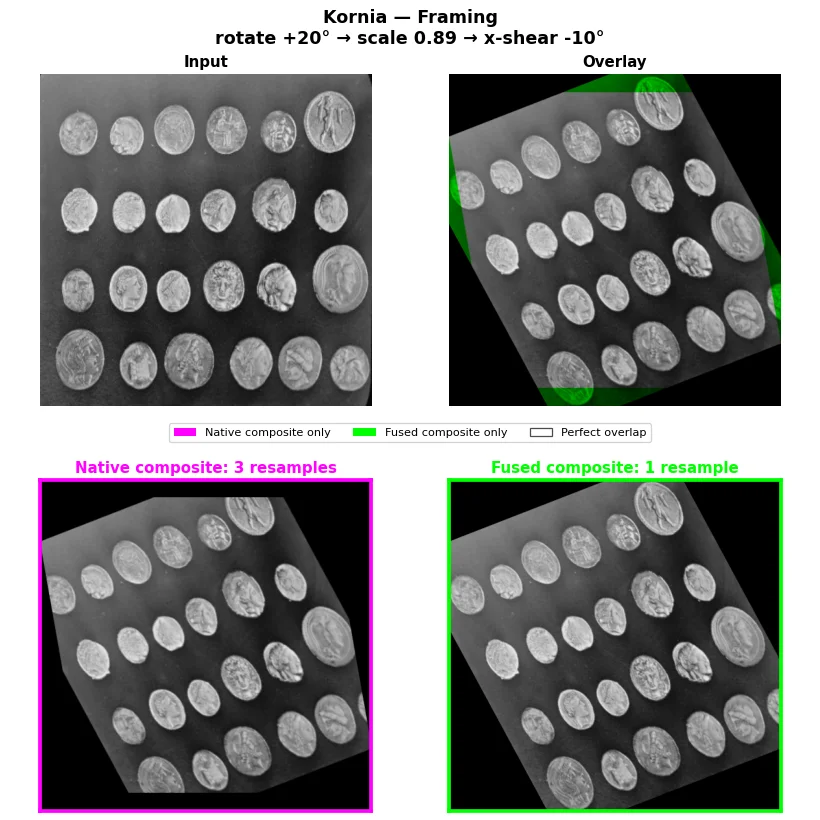
The same fixed Kornia rotation → scale → shear recipe is evaluated below. The native route resamples three times; Fuse Compose composes the geometry and samples once. The magenta/green/white overlay makes local disagreement visible without claiming native-pixel parity.
See three fixed recipes for each of Kornia, TorchVision, and Albumentations, including their exact limits.
| Capability | What is implemented |
|---|---|
| Affine fusion | Registered rotation, affine, shear, translation, scale, and exact discrete operations are grouped within compatible same-backend runs. |
| Exact geometry | Supported flips and discrete operations use lossless tensor paths where the segment contract permits it. |
| Projective fusion | Consecutive registered perspective transforms compose as 3×3 homographies; affine↔projective transitions remain boundaries. |
| Linear color fusion | Supported brightness, contrast, brightness/contrast-only ColorJitter, and standard RGB Normalize paths can collapse into color-matrix segments. |
| Crop-resize | Registered RandomResizedCrop has a dedicated segment; a preceding affine run can be absorbed on Kornia/TorchVision torch paths. |
| Flexible construction | Native numeric ranges, Kornia transforms, TorchVision transforms, Albumentations transforms, or a mixed-backend list. |
| Portable configuration | Frozen TransformSpec values resolve a declarative pipeline against a chosen backend with strict unsupported-operation handling. |
| Auxiliary coordinates | Masks, dense xyxy/xywh boxes, and dense keypoints can follow supported fused matrices, subject to the safety limits below. |
| Ragged detection | augment_detection_batch adapts a FusedCompose with data_keys=["input", "bbox_xyxy"] to one TorchVision-style target mapping per image, including clipping and aligned filtering. |
| NumPy bridges | HWC/BHWC NumPy ↔ BCHW torch converters and NumPy output are available; conversion to NumPy detaches and moves data to CPU. |
| Execution controls | Albumentations cv2 or torch execution, Kornia-dependent downscale antialiasing, interpolation, padding, and color clipping policies. |
| Precision and compile | Optional torch.compile of warp/color/LUT cores on non-CPU paths; opt-in pipeline_dtype="bfloat16"|"float16" low-precision cores with matrices and parameter sampling kept in float32/64, no accuracy guarantee. |
| Plan inspection | Human-readable plans, structured descriptors, a warp-saving estimate, and the last matrix-producing segment are exposed. |
| Training integration | Pipelines are nn.Module objects and have tested pickle/serialization paths for common worker use. |
antialias=True is opt-in for aggressive crop-resize downscales. It evaluates each sample's scale and prefilters only samples that need it; enabling the option requires Kornia and raises ImportError during pipeline construction when that optional dependency is missing. The default remains unfiltered and does not require Kornia.
This is an allowlist, not a claim about every upstream transform. Rows are primitives named by the most common class name across backends; a check means the backend registers that class name, otherwise the cell shows the backend-specific class, entry point, or a note. Native/direct cells name the Compose.from_params arguments.
Geometry
| Primitive | Kornia | TorchVision v1/v2 | Albumentations | Native/direct |
|---|---|---|---|---|
RandomRotation |
✓ | ✓ (expand=False) |
Rotate, SafeRotate |
rotation |
RandomAffine |
✓ | ✓ | Affine, ShiftScaleRotate |
— |
| Scale | via RandomAffine |
via RandomAffine |
via Affine, ShiftScaleRotate |
scale, scale_x/y |
RandomShear |
✓ | — | — | shear_x, shear_y |
RandomTranslate |
✓ | — | — | translate_x/y |
RandomHorizontalFlip |
✓ | ✓ | HorizontalFlip |
hflip_p |
RandomVerticalFlip |
✓ | ✓ | VerticalFlip |
vflip_p |
RandomRotate90 |
RandomRotation90 |
— | ✓ | — |
D4 |
— | — | ✓ | — |
Transpose |
— | — | ✓ | — |
RandomPerspective |
✓ | ✓ | Perspective |
— |
RandomResizedCrop |
✓ | ✓ | ✓ (backend-specific execution limits) | — |
Color
| Primitive | Kornia | TorchVision v1/v2 | Albumentations | Native/direct |
|---|---|---|---|---|
RandomBrightness |
✓ | via ColorJitter |
via RandomBrightnessContrast |
brightness |
RandomContrast |
✓ | via ColorJitter |
via RandomBrightnessContrast |
contrast |
ColorJitter |
✓ (brightness/contrast) | ✓ (brightness/contrast) | — | — |
Normalize |
✓ (3-channel RGB) | ✓ (3-channel RGB) | ✓ (standard mode, 3-channel RGB) | — |
RandomGamma |
✓ | — | ✓ | — |
RandomSolarize |
✓ | ✓ | Solarize |
— |
RandomPosterize |
✓ | ✓ | Posterize |
— |
RandomEqualize |
✓ (float tensors only) | ✓ | Equalize (unmasked, by_channels=True) |
— |
Per-channel non-linear scalar maps — gamma, solarize, posterize, and supported per-channel equalize — are registered per backend as listed in the Color table above. Static maps compose into a table; equalize builds a separate per-image, per-channel histogram table at its runtime position, so static neighbours remain fused on either side. The uint8 Albumentations native path and the TorchVision equalize table match their native sequential operations exactly; Kornia's installed equalize accepts floating tensors only. The float tensor path retains an interpolation tolerance: it detects large lookup jumps and switches to a sharp step rule there, rather than smearing a discontinuity across a grid cell. Residual non-linear barriers include cross-channel saturation/hue and Albumentations masked or luminance (by_channels=False) equalize, which are not per-channel scalar maps.
Other unknown and nonlinear operations generally become passthrough barriers. That preserves pipeline construction in many image-only cases, but passthrough is not automatically numerically transparent, device-efficient, or auxiliary-target safe.
Gaussian blur is a narrow exception: consecutive Gaussian blurs fold into one operation, and a Gaussian blur commutes to the end of the run when the affine that immediately follows it does not downscale, letting that affine run collapse to a single warp (the surrounding affines then fuse as any affine chain does). Axis-aligned affine scales use Kornia's native Gaussian primitive; rotated (or sheared-and-upscaled) affines use a normalized sampled full-covariance Gaussian with 3-sigma support capped at 63 pixels. A pure shear has a smallest singular value below one, so it is refused like any other downscale — only a shear combined with enough upscale to keep both singular values at or above one reaches the covariance path. The blur stays a barrier when the following affine downscales (its smallest singular value drops below one), and always for projective transforms and non-linear kernels. Kornia's installed sharpness remains a barrier because it clamps intermediate values and restores borders, so it is not a linear shift-invariant kernel chain. The native Albumentations Gaussian path folds consecutive blurs only; it does not commute through affines because that fused path cannot guarantee the backend's random-number stream.
import torch

from fused_transforms import Compose, ReorderPolicy

torch.manual_seed(7)

augment = Compose.from_params(
    rotation=(-15.0, 15.0),
    scale=(0.9, 1.1),
    shear_x=(-4.0, 4.0),
    translate_x=(-8.0, 8.0),
    hflip_p=0.5,
    reorder=ReorderPolicy.NONE,
)

images = torch.rand(4, 3, 128, 128, dtype=torch.float32)
augmented, matrix = augment(images, return_matrix=True)

assert augmented.shape == images.shape
assert augmented.dtype == images.dtype
assert matrix is not None
assert matrix.shape == (4, 3, 3)

print(augment.fusion_plan)
descriptors = [(d.kind, d.n_warps_saved) for d in augment.fusion_plan_descriptors]
print(descriptors)
Fusion plan and saved warp count for the quick-start pipeline
fused(_DirectParamTransform, _DirectFlipTransform)
[('fused', 1)]
The common fused input contract is a floating BCHW torch tensor. Every public object lives under the single fused_transforms import.
import torch
import torchvision.transforms.v2 as T

from fused_transforms import Compose, ReorderPolicy

augment = Compose(
    [
        T.RandomRotation(15.0),
        T.RandomAffine(degrees=0.0, scale=(0.9, 1.1)),
        T.RandomHorizontalFlip(p=0.5),
    ],
    reorder=ReorderPolicy.NONE,
)

output = augment(torch.rand(8, 3, 224, 224))
Kornia and Albumentations transform objects follow the same BCHW entry point when used in tensor pipelines. Albumentations also has an image-only HWC NumPy compatibility call, but it is not a replacement for native multi-target dictionaries and processors.
Mixed-backend pipelines are supported, with every backend change acting as a hard fusion boundary.
To route generated samples through a fused pipeline, see Generate and augment: the HWC uint8 arrays and pixel-edge boxes synth_datasets produces already match the conventions the engine expects.
The latency and device numbers below are historical smoke measurements from the 2026-07-12 local audit on macOS arm64, fuse-augmentations 0.9.0.dev0 (the distribution's name before the vision-synth rename), Python 3.12, PyTorch 2.10, and 256×256 inputs. The CPU tensor-memory rows come from a corrected, separately scoped 2026-09-06 sweep. None establishes current-head or release-wide performance. The benchmark methodology records the controls required before reusing these results.
| Measurement | Observed result | Interpretation |
|---|---|---|
| Fixed 45-case CPU, batch-1 score | 1.79× geometric mean of native/fused latency | Historical, unpaired smoke result; rerun after the benchmark RNG controls before using it as a comparison claim. |
| Five-op geometric chain, CPU batch 1 | 6.52× Kornia, 14.48× TorchVision in one quick run | Historical quick-run result; sampled-parameter pairing and endpoint equivalence were not established. |
| CPU tensor memory, 3-op chain | 72-row corrected sweep completed | September 6, 2026 CPU Torch tensor-timeline measurement; it does not measure total process memory or accelerator peaks. |
| TorchVision 3-op, CPU batch 8 peak | 30.500 → 16.002 MiB native/fused | Corrected live tensor peak for that one workload. The former 117.5 MB → 38.0 MB result remains withdrawn. |
| Apple MPS quick sweep | Faster in only 9/28 comparable Kornia/TorchVision pairs | Historical quick sweep; benchmark the current pipeline on the deployment device. |
| CUDA | Historical sweep documented separately | The September 5, 2026 CUDA run is historical; current runner availability and current-head measurements are unverified. |
Single operations can be slower because there is no resampling to eliminate. Color-heavy pipelines retain color cost. Small accelerator workloads can be dominated by launch, sampling, compilation, or conversion overhead. Always benchmark the exact production pipeline and keep a correctness/parity gate beside the timing. See the historical benchmark record for dated results and the current measurement boundaries.
The corrected CPU tensor-memory sweep records live bytes, preexisting baseline, incremental peak, and physical allocation events; the old profiler ratios remain withdrawn. bench_rfdetr_shape.py makes all four variants reproducible and converts them to a common CPU model-ready endpoint: float32 BCHW images in [0, 1], float32 (N, 4) boxes, and int64 (N,) labels. It does not replay shared sampled geometry, so it is not a paired raster comparison.
Fusing geometry changes when interpolation happens. That can preserve more detail than repeatedly warping an already warped image, but it also means the result is not a byte-for-byte substitute for the native chain.
For research or parity-sensitive use:
- set
ReorderPolicy.NONEexplicitly; - pair or record sampled parameters and matrices;
- compare output coordinates and task metrics, not only shapes;
- report backend, device, versions, dtype, image size, and batch size;
- separate compile warmup from steady-state timing;
- publish losses and skips alongside wins.
POINTWISE and AGGRESSIVE reordering are behavior-changing optimizations: moving color across geometry can alter border and clipped pixels. AGGRESSIVE currently behaves like POINTWISE.
Registered fused geometry can route:
- masks as BCHW tensors with nearest or bilinear sampling;
- boxes as dense
(B, N, 4)xyxy or xywh tensors; - keypoints as dense
(B, N, 2)tensors.
Important boundaries:
- unknown or unclassified spatial transforms with auxiliary targets are rejected before execution; image-only passthroughs still need review;
- mask padding uses the independent scalar
mask_fill(default0) even when image padding is border/reflection; - nearest masks are intentionally detached; bilinear requires floating soft masks;
- boxes are AABB-wrapped after rotation but are not clipped or filtered;
- labels, visibility, ragged instances, invalid-box removal, and keypoint validity are application responsibilities;
- the Albumentations HWC NumPy path is image-only.
For detection and segmentation, validate every transform class and warning before training.
fusion_plandescribes the current segment structure.fusion_plan_descriptorsprovides structured, serializable segment metadata.n_warps_savedis a plan estimate, not a literal native interpolation counter for exact operations.return_matrix=Trueandtransform_matrixexpose the actual forward pixel-centre matrix from the last supported matrix-producing segment. Fused affine/projective, exact D4/flip/quarter-turn, and direct deterministicletterboxsegments publish a(B, 3, 3)matrix; it is not an automatic whole-pipeline matrix across backend, projective, crop, or passthrough boundaries.
Use per-call matrix return when output and transform provenance must stay paired.
For one fused affine or projective geometric segment, pass the matrix returned by the same call to inverse to map a prediction back into the original frame. Exact and deterministic letterbox matrices are available for coordinate recovery through the target helpers, while the image inverse remains narrower. This pairing is safe for concurrent calls; inverse deliberately does not read the mutable transform_matrix property.
import torch

from fused_transforms import Compose

augment = Compose.from_params(translate_x=(2.0, 2.0))
images = torch.rand(1, 3, 16, 16)
prediction_augmented, matrix = augment(images, return_matrix=True)
prediction_original = augment.inverse(prediction_augmented, matrix=matrix)

assert prediction_original.shape == images.shape
With data_keys, pass the augmented auxiliary targets in the same positional order; masks use the matching sampling grid and boxes/keypoints use the inverse pixel matrix. Keypoints and masks recover to sampling precision, but bounding boxes are axis-aligned: a forward-then-inverse box is exact only for axis-aligned transforms (flip, scale, translation) and inflates under a rotation, shear, or projective warp. inverse raises instead of guessing for crop-resize (cropped pixels are lost), color/LUT/blur or passthrough segments, exact-only segments, multiple segments, or a missing paired matrix. It is geometric-only and cannot recover values discarded by interpolation or padding.
For ragged detector targets, import augment_detection_batch from the package root. It requires a pipeline whose data_keys are exactly ["input", "bbox_xyxy"], accepts one mapping per image with floating boxes and int64 labels, and returns new mappings after pixel-edge clipping and aligned filtering. See Detection and keypoints for optional fields and thresholds.
Use synth_datasets when:
- you need labelled images before collecting or annotating real data;
- you want a repeatable loader, target-conversion, or convergence check;
- you want to vary one nuisance at a time while placement stays fixed.
Prefer real data when:
- you need an accuracy claim about photographs or production data;
- your task depends on texture, lighting, or appearance that drawn shapes do not model.
Use fused_transforms when:
- data is already a BCHW torch tensor;
- the pipeline contains several registered geometric transforms;
- repeated resampling is a fidelity, memory, or throughput concern;
- you can validate output semantics for the exact backend and task.
Prefer the native backend container when you require:
- PIL or unbatched CHW input;
- full Albumentations dictionary processors;
- exact native centers, fills, pixels, hooks, or RNG behavior;
- unsupported spatial transforms with masks, boxes, or keypoints;
- backend-specific per-transform interpolation semantics; per-transform border modes are available with
padding_mode="per_transform"when they map exactly, while opaque modes stay native boundaries with a warning and the default override is unchanged.
The repository includes a complete MkDocs Material site:
- Overview
- Installation
- Known limitations — for both halves
- FAQ
- Application walkthroughs
Synthetic datasets:
- Synthetic data generation
- Prototyping and convergence checks
- Shape families and tasks and keypoints
- Annotation formats and difficulty bands
- Customization and extension
- Dataset generation API and dataset scenes and outputs API
Fused augmentation:
- Backend-free quickstart
- How fusion works and exact capabilities
- Backend and configuration guides
- Auxiliary-target safety
- Reproducibility
- Quality and benchmark evidence and research methodology
- Core API and the generated references for the notable public API
The site configuration provides local search, per-page descriptions, canonical/Open Graph metadata, sitemap and crawler files, an llms.txt agent index, and GitHub Pages publication automation.
Benchmark and memory scripts live in experiments/. They expose cases where fusion loses as well as wins.
uv run --all-extras --group benchmark python experiments/optimize_score.py
uv run --all-extras --group benchmark python experiments/bench_gpu_batch.py --quick
uv run --all-extras --group benchmark python experiments/bench_memory.py --quick
These three headline commands are not the full set: experiments/ holds eight benchmark scripts, including bench_augmentation_pipelines.py, bench_primitive_vs_affine.py, bench_rfdetr_shape.py, bench_albu_preparation.py, and bench_antialias.py. The experiment guide lists their purposes; quality and benchmark evidence records results and limits.
Dataset rendering and gallery scripts live in examples/, including generate_synthetic_dataset.py, render_scene_gallery.py, and render_shape_reference.py.
Treat quick runs as smoke evidence. Release-grade comparisons need independent processes, uncertainty intervals, paired RNG state, output-parity assertions, and full environment provenance.
Bug reports and focused pull requests are welcome. Open an issue before a public API or architecture change.
Documentation example authoring and generated-test instructions are in CONTRIBUTING.md. Generated documentation tests are recreated in CI and should not be committed.
Build the docs locally with:
uv sync --group docs
uv run --group docs mkdocs build --strictApache-2.0 © 2025–2026 Jiri Borovec.