- Preset loading freezes: self-referencing shader macros no longer cause an endless loop and rapidly increasing memory use.
- Custom waveform crashes: audio sample reads stay within their buffers, including presets with large or negative separation values. Oscilloscope waveforms can safely use up to 512 points.
These fixes are backported from projectM PR 1025 (HLSLParser only) and PR 1029. The engine remains based on projectM 4.1.7.
- Automatic releases: each successfully tested merge to
mainpublishes a new patch release with reviewed PR release notes, current Downloader/install links, APK/core AAR downloads and SHA-256 checksums. - Milkbeat core updates: publishing a new core triggers Milkbeat's rebuild; a core already consumed by its latest release does not trigger a duplicate rebuild.
The freeze and waveform fixes are included in the core AAR used by Milkbeat.
No changes to the app itself.
- Core library AAR: every release now includes the
:corevisualizer engine (projectM, native libraries forarmeabi-v7aandarm64-v8a, presets) asprojectM-TV-core-<version>.aar. The same file is also attached asprojectM-TV-core.aar, so this link always serves the newest one. CI builds offer it as thecore-aarartifact. - Milkbeat follows core releases: each release triggers a Milkbeat rebuild with the new core.
- Configure track titles directly: the startup dialog opens the app-specific notification-access page where supported, then falls back to the notification-access list, Apps or Settings on other TVs.
- Permanent Dismiss: the old OK button is now Dismiss and saves your choice across restarts. Configure does not permanently dismiss the reminder. Settings → Advanced → Track titles always reopens setup.
- Screenshot setup guide: the GitHub Pages walkthrough covers audio permission, notification access, All / Dance selection and performance settings with real TV captures.
- Dance collection: 500 existing presets selected automatically for large bass-driven visual changes. Choose Music category › Dance in the settings panel. Automatic changes, Random and Previous stay within the collection, subject to the TV's existing skip rules.
- All remains the default, with the full 9,606-preset library. The category you choose is saved.
- Technical guide: how the Dance collection is measured, including controlled renders, pixel differences, ranking, cache identities and measurement limits.
- A category switch stays pending until an eligible preset is loaded. Failed preset loads are retried across frames instead of leaving an old out-of-category preset marked as selected.
- The collection uses measured whole-screen bass response rather than preset names or the presence of bass variables in their code. Renderer changes invalidate measurements; release candidates are revalidated with the production renderer.
- Strength describes the tested signals and renderer, not suitability probabilities or a guarantee for every song or GPU. No music recordings are included in the app.
Fixes from upstream projectM. Four fixes merged into projectM after its 4.1.7 release are now in the app (projectM patches 0017–0020), ahead of the next projectM release.
- Fractal and domain-warp presets show their effect again. projectM's shader translator rejected code such as
(float2(x, y)) * zoom, and the preset then quietly lost its warp effect. 19 bundled presets are affected, among them the Cope - fractal explorer, cope - mandelbrot (32 iterations) and p wrap twist fold and starch series. All other presets translate exactly as before (checked on every bundled preset shader). - Smoother waveforms. The app passed projectM 480 audio samples per frame, but projectM analyses 576, so the oldest part of each waveform came from an earlier capture and could jump. The full 576 samples are now passed.
- Preset equations behave as in MilkDrop. Comparisons,
whileloops and division by values very close to zero now use MilkDrop's tolerance of 0.00001 (projectm-eval 1.0.7). Some presets that depend on such values can move or animate a little differently, as they do in MilkDrop. A small memory leak for presets with broken equations is also fixed.
- Translating a preset's shaders no longer slows down out of proportion on long shaders, which saves a little time when a preset is loaded for the first time.
Much faster rendering on most TVs. On an Ugoos AM6 (Amlogic S922X with a Mali-G52 GPU) the visuals run with 10–26% more frames per second on presets with a composite shader, and up to twice as many on presets without one (26 → 55 fps at 4K). With the new 30 fps default, Auto picks a much higher resolution. projectM moved far more data through memory per frame than needed; TVs with a tile-based GPU (Mali, Adreno, PowerVR: most Android TV boxes and TVs) were held back by that, not by the GPU's power. The picture is unchanged.
- Default frame rate 30 fps (half the refresh rate: 25 fps at 50 Hz), on every device. An even 30 fps looks smooth for these visuals, and twice the time per frame lets Auto choose a much higher resolution, also on less powerful TVs. The update moves everyone to the new default once, including those who chose a frame rate, and Auto learns its resolution anew. A powerful TV can be set back to 60 fps under Settings › Frame rate.
- Auto resolution recovers after a heavy preset. A resolution that was too slow is tried again from the next preset on, and a resolution that keeps failing waits longer each time (up to 16 presets). Before, one very heavy preset could hold the resolution down for 10 presets, or for the rest of the session.
- Presets that are far too slow are skipped, on every TV. A preset that stays below half the target frame rate, also when a lower resolution does not help because the CPU is the limit, is replaced after about 8 seconds and skipped from then on on that TV (on an AM6 one preset ran at 3–7 fps at any resolution). This was on only for low-end devices; it can be switched off under Settings › Advanced › Skip slow presets.
- Less memory traffic per frame (projectM patches 0009–0016):
- Render targets that a pass overwrites completely are no longer loaded from memory first.
- Up to three of the four full-screen copies per frame that only flipped the image are gone.
- The warp, shapes and waves are drawn in one pass where the preset allows it, and the blur passes draw straight into their textures.
- The final image is drawn straight to the screen instead of being copied there. A preset switch by remote control can wait one frame (16–33 ms) for this.
- The warp mesh is drawn in one go, which also saves the CPU about 1 MB of copying per frame.
- The only visible difference possible: when a preset turns motion vectors on, they can be slightly off in that one frame.
On the AM6 at fixed resolutions, with the same preset and music, frames per second before → after:
| Preset | 1080p | 1440p | 4K |
|---|---|---|---|
| Heavy, with composite shader | 33.6 → 37.1 | 20.4 → 23.3 | 9.3 → 10.8 |
| Medium, with composite shader | 43.8 → 53.5 | 25.4 → 32.0 | 13.1 → 15.8 |
| Light, without composite shader | 60 → 60 (max) | 52.1 → 60 (max) | 26.1 → 55.1 |
- The app listens only to the music app's own audio session. It finds that session by itself, whatever the TV's audio output (also Dolby or passthrough). The Media capture audio source, with its screen-cast prompt at every launch, is gone, and so is the Audio source setting: neither Media capture nor Android's visualizer on the TV's main output (session 0) was ever shown to receive music, and the player's session worked on every device tried.
- Fewer permissions. The app no longer asks for Foreground service, Media projection or Change audio settings. For audio it only needs Record audio, which Android requires for any visualizer; the microphone is not used.
- Fewer searches. When no audio is found while music plays, the app searches again when the next track starts (with notification access), and otherwise once a minute (was every 20 seconds). At launch, and when you return to the app, it searches right away.
- Smaller, optimized build. Release builds are shrunk and optimized with R8.
- "No audio detected." When music plays at launch but the app finds no audio, the lower left says so.
- The README's only device statement is that at least 2 GB of RAM is highly recommended; the NVIDIA SHIELD measurements moved to an appendix.
- Auto-update finds new releases sooner. With Settings › Advanced › Auto-update on, the app now checks GitHub at every launch and every 6 hours while it stays open. Before, it checked at most once a day and only when the app came back to the foreground, so a TV left running the visualizer never saw a new release. A failed check is retried at the next launch or 6 hours later.
- The rendering engine is now a separate library module inside the app, so other apps can embed it. The visuals and behaviour are unchanged.
Restored visuals, with a fix shared upstream. A preset showing a tiny white mark while bass-heavy music played led to the discovery of three linked bugs in projectM's shader translator. This release fixes them in ProjectM TV. The changes, regression tests and reproducible presets have also been submitted to the projectM maintainers in upstream PR #1031, so other projectM integrations can benefit when the fix is adopted.
- Colours and geometry return in affected presets. Floating-point remainder was converted to scalar integer maths, losing fractional colour values and vector components. Presets such as ORB - Burnt Ice --- Isosceles edit could show almost nothing despite receiving the music correctly.
- Correct shader calculation order. A missing operator-precedence entry grouped calculations incorrectly. martin - elusive impressions mix2 could turn into a flat pale field; martin - city lights used incorrect scrolling offsets.
- Preserved integer behaviour. Integer counters keep integer remainder; floating-point and vector expressions retain their proper types and components.
The unchanged presets were tested on old and fixed engines using the same 1926 – Rainy Melody (Original Mix) excerpt, 1:00–1:20, with matched timing, seeds, audio and textures.
- Burnt Ice: a tiny white central mark becomes a large coloured scene. Mean visible screen coverage increased from 0.00965% to 54.88% in the measured window.
- Elusive Impressions: detailed imagery replaces the largely flat pale output. Staged builds separate the precedence defect from the incorrect result type and integer division.
- City Lights: the intended centred scrolling offset is restored. Its visual difference is subtler than the two cases above.
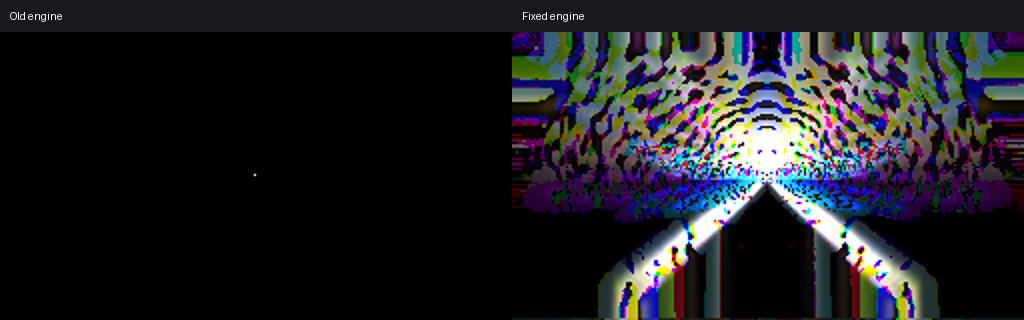
Real-music before/after videos, original presets, generated shaders and staged-build results · Ten affected presets: individual comparisons and downloadable originals
Public comparison videos are muted; the music recording is not redistributed. Visual measurements were made on the macOS test engine at 256×144 and 30 fps, excluding the first four seconds. They demonstrate this rendering defect, not a general preset-quality score.
Ten new translator regression tests cover floating-point/vector types, integer and unsigned operations, calculation order, and generated desktop/ES/legacy shaders. 157 upstream projectM tests and 107 tests in the pinned integration pass. GPU colour checks pass, and all ten affected presets regained visible output in paired renders. The fix is included in both Android ARM builds.
- Auto-update (optional). Switch on Settings › Advanced › Auto-update and the app checks GitHub for a new release once a day and downloads it in the background. When it is ready, a notice appears in the lower left and the settings panel shows Install at the top; Android's installer asks you to confirm. The first time, it asks you to allow installs from ProjectM TV instead; Android then restarts the app, and you select Install once more. The download is checked before it is offered: it must be this app, newer, and signed with the same key.
- Off by default. While it is off, the app makes no network connection at all. Android lists the internet permission for every install, because Android grants it at install time and has no per-app switch for it. Apps installed from F-Droid show Via F-Droid and are updated by F-Droid.
- An interrupted download (weak Wi-Fi) continues where it stopped, instead of starting over.
- Diagnostics no longer run off the bottom of the screen: they now have their own panel next to Settings › Advanced.
- The visuals react to the music about 1 second after launch (was about 10 seconds on the SHIELD). The app now looks for the music app's audio session right away instead of first waiting for several seconds of silence, and remembers the session it found for the next launch. If nothing is found while music plays, it looks again every 20 seconds.
- The README lists the app's highlights, and states the devices it was validated on: NVIDIA SHIELD TV (2 GB) and SHIELD TV Pro (3 GB). Devices with 1 GB of memory are not recommended.
- Heavy presets no longer turn needlessly blurry. Since 1.9.15, Auto resolution could lower the resolution step by step (e.g. from 1260p to 720p within 15 seconds) on presets that are limited by the processor, where a lower resolution does not help. It now checks whether a lower resolution made the preset faster; if it did not, it returns to the sharper resolution for that preset.
- Faster preset switches when memory allows. The picture buffers of the previous preset are reused for the next one instead of being created anew. This only happens while at least 20% of the memory is free, takes at most 48 MB, and stops at the first low-memory warning. The picture is unchanged (checked pixel by pixel).
- Random and Previous on the remote no longer pause the picture. The preset Right (random) and Left (previous) would pick is now prepared in the background as well, like the next preset: on the SHIELD such a switch takes 20–40 ms instead of up to about 0.9 s.
- Much faster presets with many shapes. projectM drew every instance of a custom shape separately; it now draws them in batches. The picture is unchanged (checked pixel by pixel), while presets with thousands of shapes run 70–90% faster on the SHIELD (e.g. 23 → 40 fps and 13 → 25 fps). About 1,700 presets draw at least 100 shapes per frame.
- After Android reports low memory, background preparation pauses for 20 seconds instead of a minute.
- Resolution changes no longer interrupt the picture. Auto resolution used to switch to a new preset with a hard cut when the frame rate collapsed, and otherwise waited for the next preset change. It now changes the resolution on the spot; the presets keep running (their pictures are scaled to the new size).
- Smoother preset switches. The shader translation of the next preset is now also done in the background, so a switch takes 16–77 ms (was 29–109 ms). In a 5-minute capture on an NVIDIA SHIELD TV Pro, no switch paused the picture for more than 67 ms (before: 83–133 ms at most switches), with no hard cuts.
- Blending two presets that are heavy on the processor still drops to about 20 fps for the length of the blend on the SHIELD.
- The explanation of how to allow notification access (for track titles) appears only once, at the first launch without access, instead of at every launch. Settings › Advanced › Track titles shows it again.
- Track titles. When the music app starts a new track, its title and artist appear in the lower left for 20 seconds, instead of the preset name at every preset change. Up, Down and Info show the current track again. The app reads the track from the music app's media session, which Android only allows with notification access: switch it on in the TV's settings under Apps › Special app access › Notification access (on the NVIDIA SHIELD: Settings › Device Preferences › Apps › Special app access › Notification access). The app explains this at launch while it is off, and under Settings › Advanced › Track titles. Without access, nothing is shown.
- The preset name is shown in the settings panel only.
- No more freeze at a preset switch. Loading a preset used to stop the picture for about a second (0.5 to 1.9 s on the SHIELD) while the graphics driver compiled its shaders. The next preset is now prepared in the background, so a switch takes a few hundredths of a second. When Android reports that memory runs low, the background work pauses for a minute, so the music player keeps its memory. Profiling also showed that projectM's shader translator spent half a second per preset setting up number formats; that is gone too.
- Smooth blends are back, without frame drops. Auto transitions blend the old preset into the new one again (instead of fading a still image) and keep the frame rate up: when the graphics chip is the limit, both presets render at a lower resolution during the blend (from 75%); when the processor is the limit, the outgoing preset renders every second frame. The menu shows the current blend resolution.
- No sudden cuts on loud beats. projectM's jump to the next preset on a loud beat is now off by default; Advanced › Cut on loud beats turns it back on.
- Resolution changes no longer force a hard cut. The presets' pictures are scaled to the new size instead of starting over.
- projectM renders custom shapes with fewer redundant graphics calls.
- New name and look. The app is now called ProjectM TV everywhere (it was ProjectM Visualizer on the TV's home screen), with a new icon and TV banner. The store listing uses the same artwork.
- "Next" could show the same preset again. After every preset in the shuffled list had played, the list was reshuffled and could start with the preset that was on screen, so a switch (by the remote, the timer or blank-preset skipping) sometimes changed nothing. The preset on screen is no longer picked again.
- No dependency metadata in the APK. The Android build tools add an encrypted list of the app's dependencies to the APK signature block that only Google Play can read; F-Droid does not accept APKs that contain it. It is switched off. (The app has no third-party Android libraries, so the list was empty anyway.)
- Nothing changes in the app itself.
- Reproducible builds, completed. The expression parser inside projectM (projectm-eval) was regenerated with whatever flex/bison the build machine had installed, which shifted line numbers in the native library's debug info and changed its build ID between machines. The build now always uses the parser sources that ship with projectm-eval, so GitHub's and F-Droid's builds are byte-for-byte identical.
- Nothing changes in the app itself.
- Reproducible builds. The native library no longer depends on where the source is checked out or where the Android NDK is installed (
-ffile-prefix-map,-fdebug-compilation-dir), and CI builds with JDK 21 like F-Droid's build server. F-Droid can then rebuild the app, confirm it is identical to the release on GitHub, and ship it with our signature, so updates work across F-Droid, Downloader and GitHub. - Nothing changes in the app itself.
- New app ID:
nl.neerdael.projectmtv. Earlier versions used the placeholdercom.example.projectm.visualizer. Android treats the new ID as a different app, so 1.9.7 installs next to the old version: uninstall the old projectM TV afterwards (its settings are not carried over). This is a one-time change, made before the app is published on F-Droid, where the ID can never change again. - Build: stable Gradle 8.14.2 instead of a 9.0 pre-release (F-Droid only builds with released Gradle versions).
- Store listing for F-Droid (
fastlane/metadata): description, changelog, icon and TV banner.
-
projectM is built from source with the app. The same projectM 4.1.7 (plus the SHIELD plasma-transition fix) is now compiled from its source code in
third_party/projectmand linked into the app, instead of shipping prebuilt libraries. Nothing changes on screen; the app's native code shrinks from about 10–12 MB to 1.3–2 MB per device type, and the whole app can be built from source, which F-Droid requires. -
Licences are stated for everything. The app's code is LGPL 2.1; the bundled presets and textures are distributed under CC0 1.0 (see
docs/THIRD_PARTY.md). -
Releases are signed with one permanent key. Up to 1.9.5, every release was signed with a different temporary key, so no update could install over the previous version. From 1.9.6 on, updates install normally and keep your settings. Uninstall 1.9.5 or earlier once before installing 1.9.6 (this resets the settings).
- One link for the newest version. https://github.com/johnneerdael/ProjectM-TV/releases/latest/download/projectM-TV.apk always downloads the latest stable release, and on the TV the Downloader app installs it with code 4821216.
- Presets that stayed black now render. The app shipped an August 2025 development snapshot of projectM (labelled 4.1.0). It now uses the 4.1.7 release, which fixes rendering bugs that made presets show nothing at all. On a SHIELD, presets that were black every time now render, for example fiShbRaiN - david bowie cpe, $$$ Royal - Mashup (1) and fed - fumez. Upstream fixes since that snapshot include:
- custom waveforms in dot mode were not drawn at all;
- blur textures used the wrong source image;
decaywas capped at 0.9375, which made most MilkDrop 1.4 presets far too dark;- bass/mid/treble reached warp and composite shaders divided by 100, so those presets barely reacted to music;
- an unintended drift towards the top left in all presets, and inverted Y/angle values in per-pixel code.
- The Plasma transition keeps the fix for NVIDIA SHIELD (projectM issue #872, float overflow), which the snapshot had and 4.1.7 lacks: it is applied as a patch.
- The skip for black presets from 1.9.4 stays as a safety net.
tools/build-projectm.shrebuilds the bundled projectM from the pinned upstream tag plustools/projectm-patches/with the Android NDK (armeabi-v7a and arm64-v8a). Before, the libraries could not be rebuilt from the repository.
- Presets that stay black while music plays are replaced at once. Some presets render nothing at all on the TV even though audio arrives and every texture is there; on the SHIELD these were mostly reaction/feedback presets. When a preset shows only black for 5 samples in a row while music plays (about 7 seconds after it starts, and counting only once the music has played for 3 seconds without a break), the app now moves on to the next one immediately.
- A preset is only put on the skip list when it is black a second time, in any later showing, so a one-off (music starting late, a slow build-up) never removes it for good.
- "Black" means every sampled pixel stays at or below about 8% brightness, moving or not. Dark presets with anything brighter are not affected.
- After 3 black presets in a row the app stops acting until a preset shows something again: that points at a rendering problem, not at the presets, and must not empty the library.
- This is Advanced › Skip blank presets, now on by default, also for anyone who had turned it off in 1.9. Turn it off to keep every preset; Skipped presets reset also forgets the strikes.
- Visuals react to music on an NVIDIA SHIELD with Dolby output. In 1.9.2 both audio sources heard silence there: the SHIELD sends media audio through its own Dolby path, which bypasses the output that Standard and Media capture listen to. The Standard source now finds the audio session of the app that plays music (SoundCloud, …) and listens there. It needs no setting and no consent.
- It starts about 10 seconds after launch; after a pause it picks the music up again within about 5 seconds.
- If Media capture is selected and stays silent while the player's session carries music, the app switches to Standard by itself, so the consent is not asked again.
- Advanced › Diagnostics shows the source as player session N;
tools/tv-diagnostics.shreports it as the source in use. - On devices where the global output mix works, nothing changes: music keeps it busy and no search runs.
- New audio source: Media capture (Advanced › Audio source, Android 10 and later). On a SHIELD with Dolby output over HDMI eARC, the standard source heard nothing: Android attaches it to an audio output that carries no music. Media capture records what media apps play (SoundCloud, Spotify, …) and leaves out notification and system sounds.
- Android shows its screen-cast consent when you pick it, and again at every launch. Declining switches back to Standard.
- A notification shows while it runs, as Android requires.
- Advanced › Diagnostics shows which source is in use;
tools/tv-diagnostics.shreports it in the summary. - Apps that block capture, and audio an app sends to the TV already Dolby-encoded, can't be visualized by either source.
A measuring release: it finds out which presets cause memory peaks when they load.
- Memory is measured for every preset. At each switch the app logs how much memory the new preset took, with its shader size, loop count and the memory weight worked out from its file (the images it loads, and a placeholder for very complex shaders).
tools/tv-diagnostics.shsummarises the biggest memory drops and compares shader-heavy with image-heavy presets. - The resolution cap from 1.9 stays for now, as a temporary safety net and not as the fix: it keeps the music app from being closed while we measure. Once the measurements show which presets cause the peaks, only those will be handled.
- The preset list is now generated by
tools/gen-preset-index.py, which also computes the weights.
- Auto no longer stays stuck at a low resolution after a low-memory warning. In 1.9 the lower resolution Auto picked when Android reported low memory was remembered, so every later launch started there (on the SHIELD: 720p). The limit now applies to that session only; the next launch starts at the level chosen for the frame rate. If 1.9 already saved 720p, Auto climbs back one level at a time, at preset switches, whenever the frame rate stays at its target.
This release fixes the problems found in on-device measurements on an NVIDIA SHIELD: music that stopped, stutters at preset switches, a slow start and dull presets.
- Music no longer stops. At 1440p and above the app used so much memory on a 2 GB SHIELD that Android closed the music app (SoundCloud) and up to 11 other apps. Resolution is now capped by the device's RAM: 1080p below 1.6 GB, 1260p below 2.6 GB, 1440p below 3.6 GB, otherwise no cap. When Android reports low memory, Auto lowers the resolution at the next preset switch. You can turn the cap off in Advanced › Memory limit.
- Smoother preset switches. A MilkDrop blend renders both presets for the whole transition. On the SHIELD that halved the frame rate for several seconds at every switch. The new lightweight transition switches straight to the new preset and fades the last picture of the old one out on top, at almost no extra cost. Advanced › Transitions:
- Auto (default) uses lightweight on low-end and low-memory devices and whenever a classic blend visibly slows down;
- Lightweight always uses it;
- Classic keeps projectM's own blend.
- Faster start. On the SHIELD, 8.4 s of the 10.4 s cold start went to listing 9,800 preset files. The list is now built into the app and read in one go.
- Auto resolution settles. It no longer keeps retrying a resolution the device can't sustain (on the SHIELD it went back and forth between 1440p and 1800p). A level that fails twice is not tried again in the session.
- Dull or empty presets:
- About 1 in 5 presets (1,866) use texture images such as
worms,cloudsorlichen. The app never shipped these, so parts of the picture stayed empty. The MilkDrop texture pack recommended by the projectM project is now included. - 14 more textures (e.g.
rose,shub1,grad3) complete more presets. - One preset whose texture could not be found anywhere was removed.
- About 1 in 5 presets (1,866) use texture images such as
- Presets cleaned up (9,795 → 9,606):
- 116 presets whose code cannot react to music at all were removed: no bass, mid, treble or volume in any equation or shader, the waveform hidden and no custom waveforms. They could only show a still or slowly drifting picture.
- 73 presets that show text, logos or photos of people through their images were removed, along with those 7 images.
- A new check (
tools/check-presets.py, run by CI) keeps these presets out.
- Presets get a second chance. Some presets were skipped as "blank" only because their textures were missing, so the skip list is cleared once when you update. Skip blank presets is now off by default.
- Resolution settings:
- A saved 4K setting falls back to Auto on a 1080p panel.
- Changing the frame rate cancels a resolution change that was already queued.
- See that the app hears your music. The settings panel has a live audio level bar under Now playing, with a status: Listening, Very quiet, No sound or No access (microphone/recording permission missing).
- Advanced › Diagnostics shows:
- the audio level: whether the TV actually delivers sound to the app (without audio most presets look dim);
- the memory limit;
- the transition style in use.
tools/tv-diagnostics.shmeasures startup, FPS per resolution, preset load times, transition FPS, 4K composition, the audio level and apps closed for low memory, all over adb. Seedocs/DIAGNOSTICS.md.- Output measurements. For each preset, the app logs how much of the picture changes while music plays. This is how we'll tell truly frozen or single-colour presets from dull ones before skipping anything.
- Loading a preset (reading it, loading its textures, compiling its shaders) still freezes the picture briefly at each switch. 1.9 logs how long each load takes; moving the loading off the display thread is planned next.
A ground-up rebuild of the engine behind the visualizer. Visuals start almost immediately, presets that show nothing are skipped, and the picture now scales from Fire TV sticks up to 4K on NVIDIA Shield and high-end TVs.
- Starts in seconds. Presets are read directly from the app instead of being copied to storage (~130 MB) on every launch. Visuals appear as soon as the screen is up.
- No more black screens. Fixed the causes of presets staying black:
- remote-control preset changes ran on the wrong thread;
- the graphics context was OpenGL ES 2.0 instead of the 3.0 projectM needs;
- audio was decoded in the wrong format.
- Real 4K. Many TVs run their menus at 1080p on a 4K panel. The app now detects the physical panel and can render at up to full 4K on Shield and similar TVs.
- Automatic resolution. Auto picks the highest resolution your device can run smoothly and adjusts between presets, so a change never interrupts a preset.
- Self-cleaning playlist. Presets that fail to load, render nothing while music plays, or (optionally) are too slow for your device are skipped and remembered.
- New TV-style menu. A compact panel with now-playing info, previous/shuffle/next controls and settings rows you change with the remote's arrows. Long preset names scroll.
| Setting | What it does |
|---|---|
| Resolution | Auto (recommended), or a fixed 720p / 1080p / 1440p / 4K, limited to what your panel supports |
| Frame rate | Full refresh rate or an even fraction (e.g. 60 or 30 fps; 120/60/30 on 120 Hz TVs). A steady 30 is smoother than an unsteady 45 |
| Transition | Blend time between presets. Shorter is faster on slow devices, because two presets render during a blend |
| Advanced › | Detail (Minimal–Ultra per-vertex mesh, the main CPU cost), Skip slow presets, Skip blank presets, skipped-preset reset, and live diagnostics (render size, panel, refresh rate, FPS) |
On devices with little memory, the defaults now favour smoothness:
- 30 fps
- a lighter mesh
- short transitions
- Auto resolution that can drop to 360p when needed
- slow presets skipped automatically
All of these can be changed in the menu.
- OpenGL ES 3.0 is now required. projectM 4 always needed it; devices without it never showed correct visuals.
- Settings reset: resolution and frame-rate settings start from the new defaults.
- Uninstall first: if you installed an earlier build yourself, uninstall it before installing this one, because the signing key differs.
- Skipped-preset list: resetting it under Advanced › brings all presets back.
| Button | Action |
|---|---|
| Right / Left | Random preset / previous preset |
| Up / Down / Info | Show the current preset name |
| Center / Menu | Open the menu; ↑↓ select a row, ‹ › change its value |
| Back | Close the panel (or return from Advanced) / exit |
Version 1.6 represents a major breakthrough in projectM Android TV, delivering the definitive solution to viewport scaling issues while introducing intelligent device-tier performance optimization. This release ensures perfect fullscreen visualization on all resolutions while automatically optimizing performance based on your specific Android TV hardware.
-
🎯 DEFINITIVE VIEWPORT SCALING FIX - Completely eliminated the root cause of viewport scaling issues
- Always Full Resolution Rendering: ProjectM now always renders at native screen dimensions (1920x1080, etc.)
- Quality-Based Performance: Performance optimization through preset complexity and quality settings instead of resolution reduction
- Universal Screen Coverage: 720p/480p performance modes now maintain perfect fullscreen display
-
🚀 Intelligent Device-Tier Performance System - Automatic hardware detection and optimization
- PREMIUM Tier (NVIDIA Shield/Tegra): Maximum quality, extended transitions, full native resolution
- HIGH-END Tier (Fire TV 4K, Mi Box S): High quality settings optimized for powerful Android TV boxes
- MID-RANGE Tier (Standard Android TV): Balanced quality with moderate optimizations
- LOW-END Tier (Budget devices): Optimized settings for smooth performance on older hardware
-
⚡ Eliminated Auto-Resolution Switching - Replaced problematic resolution scaling with smart defaults
- Device-Appropriate Defaults: Automatic selection of optimal settings based on detected hardware
- Consistent User Experience: No more jarring resolution changes during use
- User Override Available: Manual resolution controls still available for advanced users
- Native-Level Performance Optimization - Enhanced C++ performance monitoring and memory management
- Quality-First Approach - Maintains visual fidelity while optimizing computational complexity
- Advanced Device Detection - GPU model recognition, RAM analysis, and Android version consideration
- Adaptive FPS Management - Real-time performance monitoring with automatic quality adjustment
We're excited to announce version 1.5 of projectM for Android TV, which completely resolves the long-standing viewport scaling issues. This release ensures that all render resolutions (720p, 480p, etc.) properly stretch to fill the entire TV screen, providing a true fullscreen experience regardless of the internal rendering resolution used for performance optimization.c### ✨ New Features & Fixes in 1.3droid TV 1.3 - Resolution Scaling & Viewport Fixes
We're excited to announce version 1.3 of projectM for Android TV, focusing on fixing viewport scaling issues and resolution-related artifacts. This update ensures visualizations properly stretch to fill the entire screen at all resolutions while eliminating visual artifacts during resolution changes.
We're excited to announce version 1.2 of projectM for Android TV, featuring improved performance adaptation, an enhanced loading experience, and better control navigation. This update provides a more responsive and stable visualization experience, especially on lower-end devices.
- COMPLETELY RESOLVED: Viewport Scaling Issue - All render resolutions now properly stretch to fill the entire TV screen (720p, 480p no longer appear as partial screen)
- Advanced Viewport Management System - Implemented multi-layered viewport control that prevents any library override of display scaling
- Native-Level Viewport Persistence - C++ code maintains display dimensions and aggressively restores viewport after every ProjectM operation
- Real-time Viewport Verification - Added diagnostic system that detects and corrects viewport changes immediately
- Performance-Optimized Scaling - Lower render resolutions for performance while maintaining perfect fullscreen display
- Complete Cream of the Crop Preset Collection - All 9,795 handpicked presets included
- System Audio Visualization - Visualizes any audio playing on your Android TV
- Android TV Remote Control
- Left/Right buttons to change presets (now with instant transitions)
- Center/Menu button to toggle settings overlay
- Back button to exit or hide overlay
- Auto Preset Switching - Configurable timing with new extended range
- Performance Monitoring - Adaptive rendering with improved transition handling
- Full Screen Immersive Mode - Complete Android TV visual experience
- Built on projectM-4 native visualization library
- OpenGL ES 2.0 hardware-accelerated rendering
- FPS monitoring with performance mode switching
- Preset count and current preset name display
- Version information accessible in settings menu
- Minimum Android Version: Android 5.0 (Lollipop)
- Target Devices: Android TV boxes and TVs with Android TV OS
- GPU Requirement: OpenGL ES 2.0 capable GPU
- Performance: Now better optimized for lower-end devices with automatic quality adjustments
RECORD_AUDIO- Required for capturing system audioMODIFY_AUDIO_SETTINGS- Required for audio visualization processing
- Some complex presets may still cause performance issues, but are now automatically managed
- Occasional black screen when switching between certain presets
- Audio capture may not work on all devices depending on manufacturer restrictions
- Navigation in the settings menu may require multiple button presses on some remote controls
- Classic Experience: Keep transitions at 7s and preset duration around 30s
- Dynamic Show: Try shorter preset durations (10-15s) with shorter transitions (2-3s)
- Manual Control: Disable auto-change and use the remote for immediate transitions
- Performance Mode: Lower transition duration and resolution on less powerful devices
- Preset search and filtering
- Custom preset categories
- Background audio playback
- Beat detection sensitivity adjustment
- Preset rating system
- Download the APK file from this release
- Install on your Android TV using one of these methods:
- Sideload with adb:
adb install projectm-androidtv-1.5.apk - Transfer via USB and install with a file manager
- Use a sideloading app like Downloader or Send Files to TV
- Sideload with adb:
If you're updating from any previous version, your preferences will be preserved.
- projectM Development Team for the visualization library
- Jason Fletcher for the incredible Cream of the Crop preset collection
- The entire Milkdrop community for creating thousands of amazing presets
This application is released under the GPL v2 license, the same as the core projectM library.
projectm-androidtv-1.5.apk: [checksum will be generated after building the final APK]
- DEFINITIVE FIX: Complete viewport scaling resolution - 720p, 480p, and all lower resolutions now perfectly stretch to fill the entire TV screen
- Eliminated ProjectM viewport interference - Completely prevented ProjectM library from overriding display viewport settings
- Multi-layer viewport restoration - Added viewport control at Java, JNI, and native C++ levels with real-time verification
- Perfect aspect ratio maintenance - All internal render resolutions maintain flawless fullscreen display scaling
- Enhanced OpenGL state consistency - Bulletproof viewport management during all rendering operations and transitions
- Added real-time viewport verification and correction system
- Added comprehensive viewport diagnostic logging throughout rendering pipeline
- Added native-level display dimension storage and management
- Added aggressive viewport restoration after every ProjectM operation
- Added fallback viewport correction mechanisms for maximum reliability
- Updated version information to 1.5 throughout the application
- Enhanced all viewport management systems for maximum reliability
- Improved logging and diagnostic capabilities for viewport troubleshooting
- Optimized viewport restoration performance with minimal overhead
- Strengthened OpenGL state management during all rendering scenarios
- Enhanced viewport scaling implementation
- Added native viewport persistence
- Improved OpenGL state management
- First attempt at viewport scaling resolution
- Added viewport handling system
- Enhanced OpenGL viewport management
- Modern loading screen with progress feedback
- Automatic resolution adjustment based on performance
- Enhanced low performance mode with quality adjustments
- Improved navigation and visual feedback
- New transition duration slider (0-10 seconds)
- Hard cut support for manual preset changes
- Extended preset duration range (10-90 seconds)
- Improved error handling and stability fixes