Weather Overview is a widget for Scriptable on iOS. It provides a general overview of the weather in your current area.
Weather data provided by Open Weather Map. You'll need an API key in order to use the widget. You can get one here!
***Note: if you don't already have an API key with OpenWeatherMap, it can take up to a few hours for the key to activate


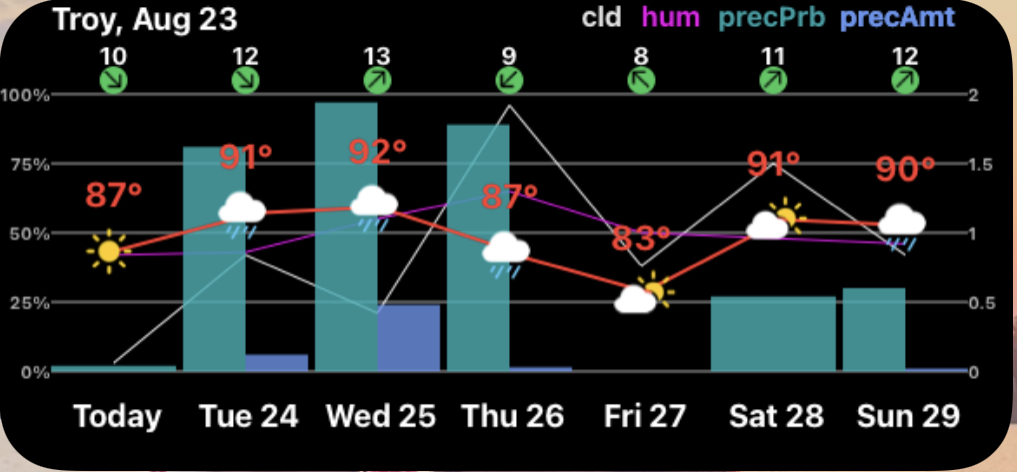

- Location and Date
- Legend for enabled and present items
- Date and Time of graphed data points (x-axis) with color depending on day (orange) or night (white)
- Temperature and Condition
- Humidity (percentage - magenta line; Abbreviated as hum in legend)
- Wind Speed and Direction (shown above the chart with a numeric value according to your units preference)
- Cloud Cover (percentage - white line; Abbreviated as cld in legend)
- Precipitation Probability Bar (left side or full bar if no precipitation amount available; Abbreviated as precPrb in legend)
- Precipitation Amount Bar (right side and using the right y-axis, color changes depending on snow/rain; Abbreviated as precAmt in legend)
- Weather Alerts (shown as
⚠️ for each present alert) Tapping the widget will take you to OpenWeatherMap.org so you can see what they are.

-
showWindspeed will enable/disable the windsoeed display on the widget
- default is showWindspeed = true
-
showWindArrow set to true will show a wind direction arrow. Set to false, and the cardinal direction will be displayed instead
- default is showWindArrow = true
-
showPrecipitation will enable / disable the ability to display the precipitation information
- default is showPrecipitation = true
-
showCloudCover will enable / disable the line display of the cloud cover forecast
- default is showCloudCover = true
-
showHumidity will enable/disable the line display of the humidity level
- default is showHumidity = true
-
showLegend will enable/disable the legend display at the top of the widget
- default is showLegend = true
-
showAlerts will enable / disable the display of alerts in your area. A yellow warning triagle for each weather alert in your area will be displayed. Tapping the widget will take you to the OpenWeather page in Safari.
- default is showAlerts = true
-
units can be set to imperial or metric for your preference
- default is units = "imperial"
-
locationNameFontSize determines the size of the location name at the top of the widget
- default is locationNameFontSize = 18
-
To display the daily forecast, set the widgetParameter to "daily"
